


TL;DR
Don't want to read the full article? Key takeaways at a glance.
| Object type | Scope | Notes |
|---|---|---|
| User | Partial | 33 properties. Manager/sponsor excluded. |
| Group | Partial | 12 properties. Ownership & dynamic rules excluded. |
| Conditional access policy | All | All properties in scope. |
| Named location policy | All | All properties in scope. |
| Authorization policy | Partial | blockMsolPowerShell, guestUserRoleId |
| Authentication methods policy | Partial | 8 methods (OTP, FIDO2, Authenticator…) |
| Application | Partial | 19 properties. |
| Service principal | Partial | 14 properties. Also restores OAuth2 grants & app role assignments. |
| OAuth2 permission grant | Partial | Admin grants only. Recovered with the service principal. |
| App role assignment | All | All properties. Recovered with the service principal. |
| Organization | Partial | 6 tenant-level MFA settings. |
| Change since backup | Action |
|---|---|
| Object added | Soft-delete |
| Object updated | Restore value |
| Object soft-deleted | Restore |
| Object restored | Soft-delete |
| Type | Recoverable? |
|---|---|
| Soft delete | Yes, within 30 days |
| Hard delete | No, permanent |
Introduction
Microsoft Entra Backup and Recovery is a built-in backup and recovery solution that lets you recover critical Microsoft Entra directory objects to a previously known good state after accidental changes or security compromises.
Prerequisites
To use Microsoft Entra Backup and Recovery, your tenant must meet these requirements:
- The tenant is a workforce tenant. External ID and Azure AD B2C tenants aren't supported.
- The tenant has Microsoft Entra ID P1 or P2 licenses.
- You're signed in with one of these roles:
- Microsoft Entra Backup Reader: Can view backups, view comparisons of changed objects between the backup state and the current state, and review recovery history.
- Microsoft Entra Backup Administrator: Has all the permissions of Microsoft Entra Backup Reader, plus can initiate difference reports and trigger recovery for changed objects. All the permissions of Microsoft Entra Backup Administrator are included in the Global Administrator role.
How Backups Work
Microsoft Entra Backup and Recovery automatically backs up supported objects once daily, retaining up to five days of backup history. The solution helps restore your tenant to a productive and secure state. Microsoft regularly improves and expands the solution to support more directory objects and attributes.
Microsoft creates backups automatically and makes them available to administrators with sufficient permissions. No signed-in user or applicatio,, even with the highest admin privileges, can turn off, delete, or modify backups in the tenant. Backup data resides securely in the same geo-location as the Microsoft Entra tenant, determined during tenant creation.
Key capabilities
Microsoft Entra Backup and Recovery allows you to:
- View available backups: See a list of backups in your Microsoft Entra tenant.
- Create difference reports: Compare your tenant's current state with a backup before recovering objects to a previous state.
- Recover objects: Recover all objects or select specific ones by object type or object ID.
- Review recovery history: View completed and in-progress recovery operations for your tenant.
Supported objects and recoverable properties
Microsoft Entra Backup and Recovery supports recovery for specific tenant object types and their properties.
To make it easier, here is the table you can search. Otherwise, you can read the rest of the article to see the attributes.
| Object type | Scope | Properties / notes |
|---|
User
Recovery for user objects supports these properties:
AccountEnabledAgeGroupCityCompanyNameConsentProvidedForMinorCountryDepartmentDisplayNameEmployeeHireDateEmployeeIdEmployeeLeaveDateEmployeeOrgDataEmployeeTypeFaxNumberGivenNameJobTitleMailMailNicknameMobileOtherMailPasswordPoliciesPerUserMfaStatePhysicalDeliveryOfficeNamePostalCodePreferredDataLocationPreferredLanguageStateStreetAddressSurnameTelephoneNumberUsageLocationUserPrincipalNameUserType
Manager and sponsor changes aren't in scope.
For reference, view the full set of user properties in the Microsoft Graph user resource type.
Group
Recovery for group objects supports these properties:
ClassificationDescriptionDisplayNameGroupTypeIsPublicMailMailEnabledMailNicknamePreferredDataLocationPreferredLanguageSecurityEnabledTheme
Group ownership changes aren't in scope. Dynamic groups can be restored or soft-deleted during recovery, but dynamic group rule changes aren't in scope.
For reference, view the full set of group properties in the Microsoft Graph group resource type.
Conditional access policy
All properties of conditional access policies are in scope. View all conditional access policy properties in the Microsoft Graph conditionalAccessPolicy resource type.
Named location policy
All properties of named location policies are in scope. View all named location policy properties in the Microsoft Graph namedLocation resource type.
Authorization policy
Recovery for authorization policy objects supports these properties:
blockMsolPowerShellguestUserRoleId
Here's a mapping of guest user role IDs with guest user permission levels:
| Permission level | Description | Role ID |
|---|---|---|
| Member User | Guest users have the same access as members | a0b1b346-4d3e-4e8b-98f8-753987be4970 |
| Guest User | Guest users have limited access to properties and memberships of directory objects | 10dae51f-b6af-4016-8d66-8c2a99b929b3 |
| Restricted Guest User | Guest user access is restricted to properties and memberships of their own directory objects | 2af84b1e-32c8-42b7-82bc-daa82404023b |
For reference, view the full set of authorization policy properties in the Microsoft Graph authorizationPolicy resource type.
Authentication methods policy
Recovery supports these authentication method policies:
- Email one-time password (OTP)
- FIDO2 passkey
- Authenticator app
- Voice call
- SMS
- Third-party software OATH
- Temporary Access Pass
- Certificate-based authentication
For reference, view the full set of authentication methods policy properties in the Microsoft Graph authenticationMethodConfiguration resource type.
Application
Recovery for application objects supports these properties:
DisplayNameDescriptionNotesApplicationTagAppIdentifierUriAppCreatedDateTimePublicClientPublisherDomainIsDeviceOnlyAuthSupportedServiceManagementReferenceRequiredResourceAccessNativeAuthenticationApisEnabledSignInAudienceGroupMembershipClaimsOptionalClaimsIsDisabledAddInsServicePrincipalLockConfigurationAppInformationalUrl
For reference, view the full set of application properties in the Microsoft Graph application resource type.
Service principal
Recovery for service principal objects supports these properties
AccountEnabledAlternativeNamesExplicitAccessGrantRequiredDescriptionLoginUrlNotesNotificationEmailAddressesPreferredTokenSigningKeyThumbprintServicePrincipalTagServicePrincipalTypePreferredSingleSignOnModePublisherNameSamlSingleSignOnSettingsServicePrincipalName
For reference, view the full set of service principal properties in the Microsoft Graph servicePrincipal resource type.
Service principal recovery is the anchor for related permissions. When a service principal is recovered, Microsoft Entra Backup and Recovery also restores:
- OAuth2 permission grants where the recovered service principal is the target object
- App role assignments where the recovered service principal is the target object
OAuth2 (delegated) permission grant
OAuth2 permission grant represents the delegated permissions granted to an application's service principal. An administrator can create delegated permission grants when a user consents to an application's request to access an API, or an administrator can grant them on behalf of all users. Permission grants that an admin creates on behalf of all users are in scope. You can identify these permission grants by consentType = AllPrincipals and principalId = null.
Permission grants created as a result of user consent aren't supported. View OAuth2 (delegated) permission grant properties in the Microsoft Graph oauth2PermissionGrant resource type.
OAuth2 permission grants aren’t recovered independently. For difference report and recovery scoping, service principals, OAuth2 permission grants, and app role assignments are grouped under a single filter in the Microsoft Entra admin center.
App role assignment
An app role assignment records when a user, group, or service principal is assigned an app role for an app. All properties of app role assignment are in scope. View all app role assignment details and properties in the Microsoft Graph appRoleAssignment resource type.
App role assignments aren’t recovered independently. For difference report and recovery scoping, service principals, OAuth2 permission grants, and app role assignments are grouped under a single filter in the Microsoft Entra admin center.
Organization
Recovery for the organization object supports these properties:
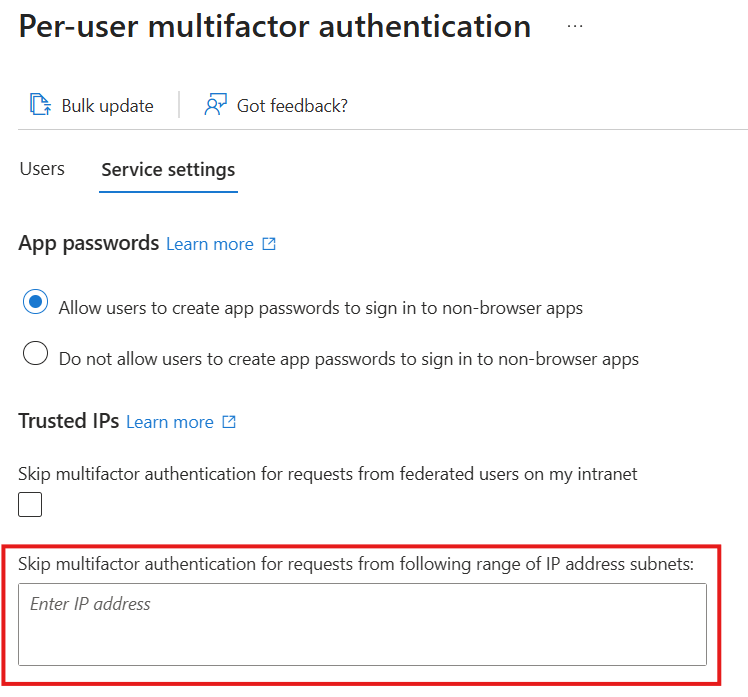
Tenant-level per-user multifactor authentication (MFA) settings:
StrongAuthenticationDetails - availableMFAMethods
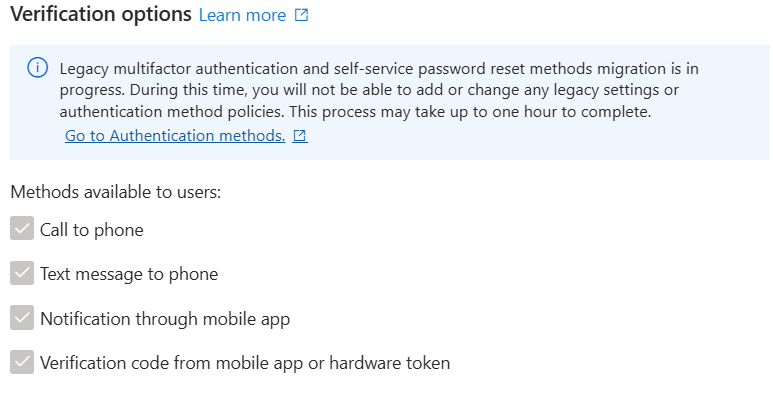
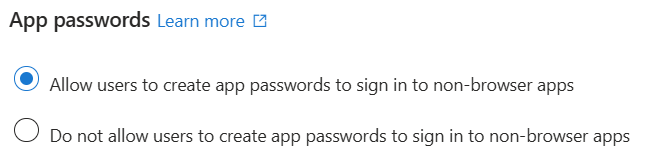
StrongAuthenticationDetails - IsApplicationPasswordBlocked
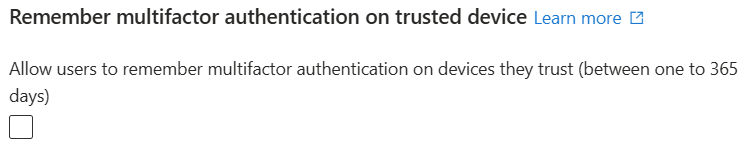
StrongAuthenticationDetails - IsRememberDevicesEnabled
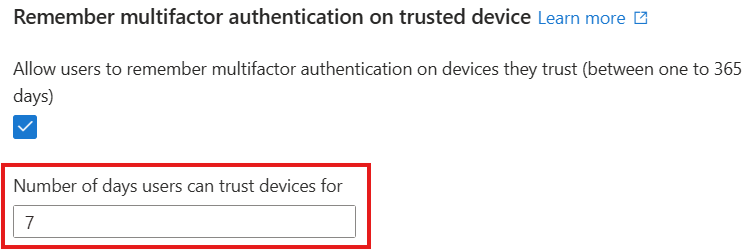
StrongAuthenticationDetails - rememberDevicesDurationInDays
StrongAuthenticationPolicy - enabled
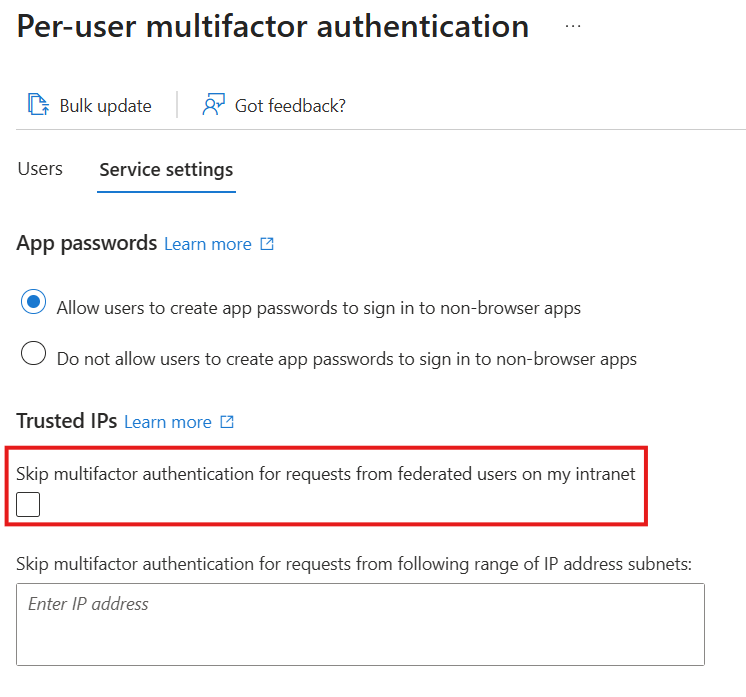
StrongAuthenticationPolicy - ipAllowList
Agent ID
The solution also supports Agent ID because it consists of user and service principal objects with distinct types and characteristics.
Limitations
Job completion time
Completion time depends on data loading and processing.
The first time you access a backup, the service loads the data (fixed time). Loaded data is reused for subsequent operations. Creating a difference report before recovery reduces recovery time.
After loading, processing identifies changes (for reports) or applies them (for recovery). Processing time varies based on the number of objects and changes.
Hard-deleted objects
Microsoft Entra Backup and Recovery doesn't support recovering or recreating hard-deleted objects. Only soft-deleted or modified objects can be restored.
Objects managed in on-premises Active Directory Domain Services
Changes to on-premises synced objects (except group memberships) appear in difference reports but are excluded from recovery. For users and groups, you can move the source of authority to the cloud to enable full Backup and Recovery functionality. Use an alternative solution for objects that remain on-premises.
If a user or group is converted to cloud-managed after the backup, recovering from that backup won't revert the source of authority to on-premises. Other supported attributes are recovered.
Broader recoverability
Use Microsoft Entra Backup and Recovery as part of a broader strategy to make your organization more resilient. To reduce the risk of malicious and accidental directory data loss, follow recoverability best practices in Microsoft Entra ID. These practices include:
- Establishing preventative operational security measures
- Regularly documenting the known good state using Microsoft Graph APIs
- Preparing processes to recover from deletion and misconfiguration
Soft deletion
What is soft deletion
Soft deletion is a foundational data protection capability in Microsoft Entra that helps organizations recover from accidental or malicious deletions. Instead of immediately and permanently removing an object, soft deletion places the object into a recoverable state for a limited retention period. During this time, the object can be restored with its properties and relationships intact.
Soft deletion is a core building block of Microsoft Entra Backup and Recovery, enabling reliable recovery without recreating objects or reconfiguring access models
When an object that supports soft deletion is deleted, Microsoft Entra doesn't immediately remove it from the directory. Instead, it transitions into a soft-deleted state:
- The object is no longer active and can't be used for authentication or authorization.
- Microsoft Entra retains the object's data for a 30-day period.
- You can restore the object during the retention window, returning it to its previous active state.
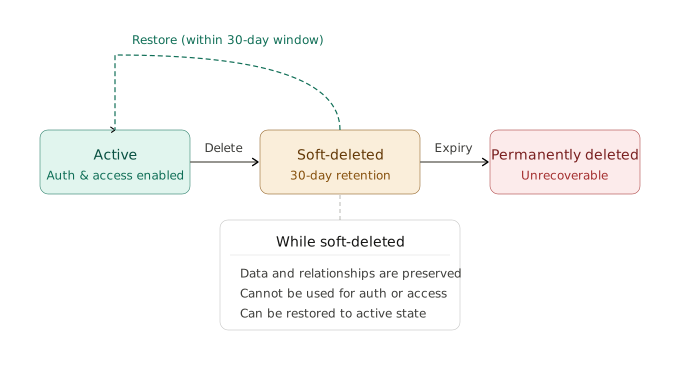
Microsoft Entra continuously records changes to supported directory objects. If an object is soft deleted, the backup captures the change and restores the object when you use that backup for recovery.
These backups are Microsoft-managed and don't require you to export or manage your own copies. Backups capture object state over time, enabling recovery to a known-good point.
During a recovery operation:
- Microsoft Entra uses backups to determine the correct object state.
- Backup and Recovery restores soft-deleted objects rather than recreating them.
- Backup and Recovery soft deletes objects added after the backup was taken.
- Object identifiers, properties, and supported relationships are preserved.
This approach avoids the risks and operational burden of object re-creation, such as:
- Loss of object IDs
- Broken dependencies
- Manual reconfiguration of access or policies
Soft delete versus hard delete
Understanding the difference between soft deletion and hard deletion is critical for recovery planning.
| Deletion type | What happens | Can it be recovered? |
|---|---|---|
| Soft delete | Object is retained in a deleted state for a limited time | Yes, within the retention window |
| Hard delete | Object is permanently removed from the directory | No |
When an object is hard deleted, it's permanently removed and can't be recovered. The only option is to create a new object, resulting in a new object ID and loss of prior configuration and relationships.
Microsoft Entra Backup and Recovery doesn't support recovery of hard-deleted objects. Organizations can use capabilities like Microsoft Entra Conditional Access to add protection for sensitive permissions, including hard deletion of directory objects.
Soft deletion is essential for building a resilient identity system because it:
- Enables fast recovery from mistakes and attacks
- Preserves object integrity and relationships
- Reduces downtime and operational risk
- Forms the foundation for reliable backup and recovery
When combined with Microsoft Entra Backup and Recovery, soft deletion enables organizations to recover from unintended or malicious attribute changes and deletions, without permanently deleting customer data.
Backup, difference report, and recovery model
Difference reports
Create a difference report to compare your tenant's current state with a backup. The report shows only changed objects. Apply filters to view changes for a specific object type or object. Without filters, the report includes all changed objects.
The difference report shows changes for users and groups synchronized from on-premises Active Directory, helping you track modified objects. However, you can't recover these synced objects through Backup and Recovery, their source of authority is on-premises Active Directory.
First-time difference report generation
The first time you create a difference report, you might experience a delay as backup data loads before the difference calculation starts. Check the progress of report generation in the Difference Reports section.
| Tenant size | Estimated data loading time for first-time report generation |
|---|---|
| 1-50,000 objects | Up to 1 hour |
| 50,000-300,000 objects | Up to 1 hour 30 minutes |
| 300,000-1,000,000 objects | Up to 2 hours |
| More than 1,000,000 objects | Up to 2 hours and 30 minutes |
The second time you create a difference report against the same backup, the report doesn't need the data loading step, so it finishes faster.
Difference calculation depends on the changes that have happened between the backup state and the current state. For 100,000 object and/or link changes, full report generation could take approximately 45 minutes to complete.
Recovery
When you recover your tenant, use filters to control which objects to recover:
- By object type: Recover only specific types of objects, such as users, groups, or applications.
- By object ID: Provide the object type and ID to recover a specific object.
- All changes: Recover all changed objects to their state in the selected backup.
Recovery performance depends on the number of changes being recovered. Recovering 500,000 changes can take up to 30 hours.
These time estimates are approximate and for general planning only. Actual performance may vary significantly based on network activity, resource availability, and tenant size.
Recovery model
The type of change from the backup state determines the recovery action:
| Change since backup | Recovery action |
|---|---|
| Object was added | Backup and Recovery soft-deletes the object |
| Object was updated | Backup and Recovery updates the object to the backup value |
| Object was soft-deleted | Backup and Recovery restores the object |
| Object was restored | Backup and Recovery soft-deletes the object |
Backup and Recovery doesn't create new objects or hard-delete objects from your tenant.
These objects must be recovered directly within the on-premises Active Directory instead.
Changes to synchronised objects will still appear in difference reports.
For more information, you can read the official Microsoft documentation:
 barclayn

Comments