
Soft delete for Entra devices (preview)

Table of Contents
No matching heading
Good news for Microsoft 365 admins: deleting a device in Microsoft Entra ID is no longer necessarily permanent. Microsoft has introduced soft delete for device objects in Entra ID (currently in preview), and it works much like the soft delete you already know for users and groups.
Instead of being wiped immediately, a deleted device is moved to a soft-deleted state and remains recoverable for 30 days. After that window, it is hard-deleted for good.
How it works under the hood
When an admin or the device owner deletes a device, the Azure Device Registration Service (ADRS) de-registers it: it disables the device's authentication refresh tokens and moves the object into a separate soft-deleted container in the directory. The object keeps its unique identifier and key material, which is what makes a full restore possible. As a bonus for quota-conscious tenants, a soft-deleted (tombstone) object only counts as a quarter of an active object.
Why this matters
The painful part of an accidental device deletion was never the device object itself, it was everything attached to it. Soft delete fixes exactly that:
- BitLocker recovery keys stored with the device are retained and become accessible again after restoration (including self-service recovery by the owner).
- LAPS passwords (local administrator passwords) are kept.
- You get a real undo for accidental deletions, just like users and groups.
- It reduces the risk of hitting your directory object quota with orphaned device objects (a soft-deleted object only counts as a quarter of an active one).
Which devices are covered
Applies to:
- Microsoft Entra joined devices
- Microsoft Entra registered devices
Does NOT apply to (these are still hard-deleted immediately when removed):
- Microsoft Entra hybrid joined devices
- Devices created directly through the Graph API (no recognized trust type)
- Some specialty device types: secure VMs with managed identities, non-persistent VDI instances, printers
What happens during the 30-day window
- The device can no longer authenticate or access resources protected by Entra ID.
- It is hidden from the portal, from Intune and from Graph queries (they return a
404 Not Found). - Its
DeviceIdstays reserved, so no new device can register with the same ID until the soft-deleted object is restored or permanently deleted. IsCompliantis reset toFalse(and other compliance flags to null/false) until the device checks in again with Intune. That is expected behavior and resolves on the next sync. Note that the MDM application ID (the management authority, e.g. Intune) is retained, so the device stays bound to its management after restoration.
Who can do it
Soft delete, restore and permanent delete are limited to specific roles:
- Cloud Device Administrator, Intune Administrator and Global Administrator can soft delete, restore and permanently delete devices.
- Device owners can soft delete their own device, but cannot restore or permanently delete it.
Custom RBAC roles for these operations are not supported yet.
How to find and restore a soft-deleted device
During the preview there is no dedicated restore button in the UI yet, but the page already exists if you go looking for it:
https://entra.microsoft.com/#view/Microsoft_AAD_Devices/DeletedDevices.reactview
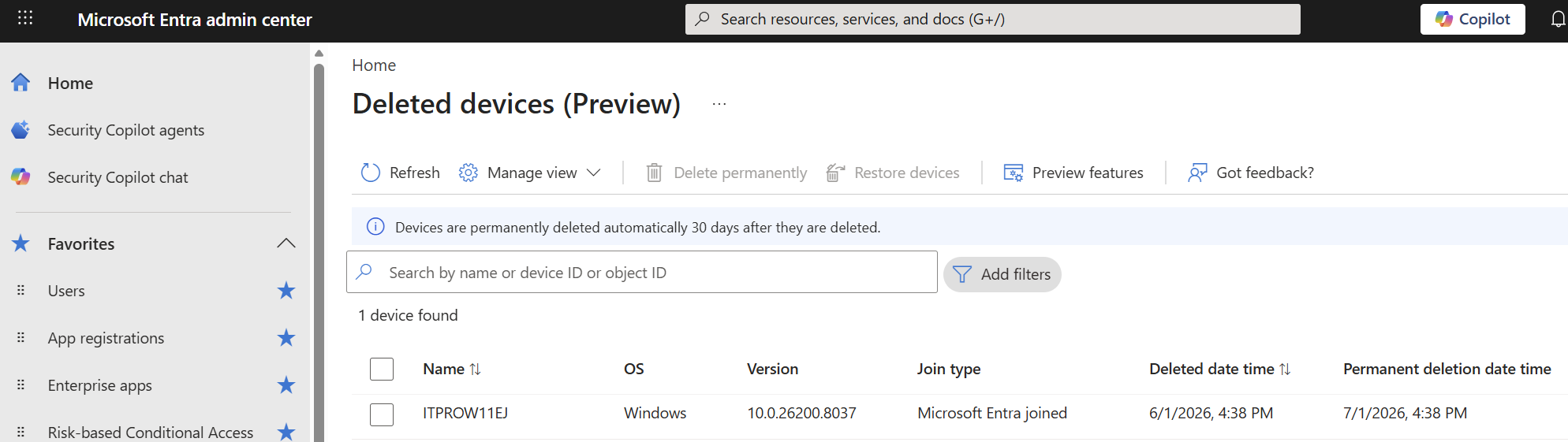
For everything else, you use the standard deletedItems endpoint via Microsoft Graph or the Graph PowerShell module (beta, since the feature is in preview):
# Connect with the right scope
Connect-MgGraph -Scopes "Device.ReadWrite.All"

# List soft-deleted devices
Get-MgBetaDirectoryDeletedItemAsDevice -All |
    Select-Object Id, DisplayName, DeletedDateTime

# Restore one by its object id
Restore-MgBetaDirectoryDeletedItem -DirectoryObjectId <objectId>
The equivalent raw Graph calls:
# List
GET https://graph.microsoft.com/beta/directory/deletedItems/microsoft.graph.device

# Restore
POST https://graph.microsoft.com/beta/directory/deletedItems/{id}/restore
After a restore, the device moves back to the active container with its identity and key material intact. Users may need to sign in again or reboot, and the compliance state stays False until the next management check-in.
The hybrid joined caveat (worth a lab test)
This is the part to keep an eye on. Hybrid joined devices are not covered by soft delete: deleting one is still an immediate hard delete.
The documentation does mention that, in hybrid environments, Microsoft Entra Connect can restore an object that fell out of the synchronization scope (for example after an OU move) instead of creating a duplicate, matching on the same DeviceId. But it does not clearly reconcile this with the "hybrid joined is not supported" statement. In other words: the behavior for hybrid joined devices is fuzzy in the current docs, and it is definitely something worth testing in a lab before you rely on it.
Current limitations
- Preview only: no portal experience for browsing/restoring yet, so restoration goes through PowerShell or Graph.
- No custom RBAC roles for soft-delete/restore.
DeviceIduniqueness is enforced across active and soft-deleted objects.- Older Azure AD Graph APIs that do not understand soft delete may hard delete a device instead of soft deleting it.
Bottom line
Device soft delete is a welcome safety net: it turns an accidental device deletion from a "you lost the BitLocker keys" incident into a 30-day undo. Just remember the two big asterisks while it is in preview: hybrid joined devices are not covered, and restore is PowerShell/Graph only for now.
Official documentation:
 Justinha