
Microsoft Entra: scheduled end of life for SMS and voice call MFA - the full preparation guide (updated September 29, 2026)

Table of Contents
No matching heading
Microsoft has announced through Message Center notification MC1426371 that SMS and phone calls will no longer be supported as built-in authentication methods in Microsoft Entra.
This is a major change for organizations still relying on telecom-based MFA methods.
Starting September 1, 2026, passkeys will become the default authentication experience in Microsoft Entra. SMS and voice calls will then be phased out and moved to a customer-configured provider model through the Microsoft Security Store.
What is changing?
Microsoft is moving Microsoft Entra toward stronger, phishing-resistant authentication methods.
In practical terms:
- Passkeys are the default and recommended authentication method since September 1, 2026.
- SMS and voice calls will no longer be available as native Microsoft Entra MFA methods.
- Organizations that still need SMS or voice will have to configure a third-party telecom provider through the Microsoft Security Store.
- The transition starts in 2026 and ends in two steps: February 1, 2027 for most users, then July 1, 2027 for Global Administrators and external users.
Microsoft explains the change clearly in its blog:
As identity attacks grow more sophisticated in the AI era, organizations need stronger authentication methods that protect users from phishing, credential theft, and social engineering. To address these evolving threats, Microsoft Entra ID is updating its authentication experience by making passkeys the default phishing-resistant authentication method, helping customers reduce reliance on phishable methods such as SMS and voice.
Microsoft also states that passwords, SMS one-time passcodes, and voice-based verification remain vulnerable to phishing, interception, and social engineering attacks.
Scope of the change
Before going through the timeline, it is worth clarifying what is actually in scope:
- Public cloud environments only. Other cloud environments will follow on a later schedule, with advance communications.
- Azure AD B2C is out of scope. For Microsoft Entra External ID, the change is planned for next year with a separate announcement.
- Passkey support for B2B users and internal guest users is planned for the end of calendar year 2026. These users are in scope of the retirement: internal guests on February 1, 2027, external users on July 1, 2027. External users sign in to your tenant with an identity managed somewhere else: a work account from another Microsoft Entra tenant (B2B collaboration), a personal Microsoft account, a Google account, a one-time passcode sent by email, or a SAML/WS-Fed identity provider. Internal guests are the older kind of guest: an account created in your own tenant, with its own password, and the user type Guest.
- External MFA methods are not impacted, unless the same users are also enabled for SMS or voice.
- SSPR is in scope. See the dedicated section below.
Source: https://learn.microsoft.com/en-us/entra/identity/authentication/concept-sms-voice-retirement-faq
Timeline
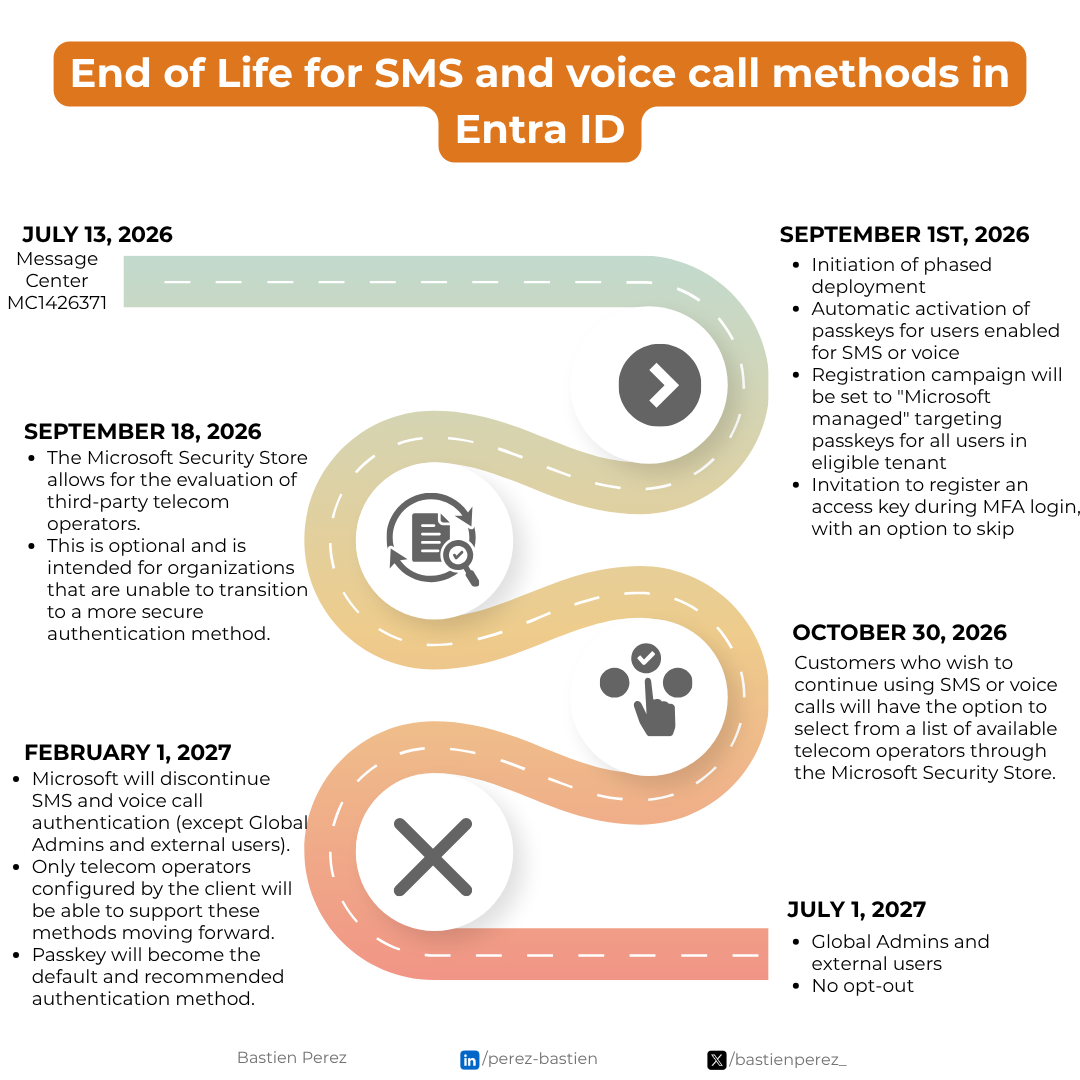
September 1, 2026
Microsoft starts the phased deployment.
For tenants with users enabled for MFA through SMS or voice call, either through the modern Microsoft Entra authentication methods policy (AMP) or through legacy per-user MFA settings:
- These users will be automatically enabled for passkeys.
- They will be placed into a passkey profile allowing all types of passkeys.
- Microsoft will automatically set the registration campaign to
Microsoft managedin order to prompt these users to register a passkey. - The next time these users sign in and complete MFA, they will be prompted to register a passkey.
- By default, they will be able to snooze this prompt without limit.
- This ability to snooze should not be interpreted as a lack of urgency: starting February 1, 2027 (July 1, 2027 for Global Administrators and external users), users whose only available MFA method is SMS or voice will be blocked until they register a passkey.
- End users must be informed about the upcoming change. Microsoft recommends using the passkey deployment guide to prepare the environment.
An important nuance: the trigger for this auto-enablement is the policy scope, not actual usage. A user who is in the scope of the sms or voice policy but who authenticates exclusively with Microsoft Authenticator will still be auto-enabled for passkeys and nudged. Conversely, users already signing in with passkeys, Windows Hello for Business or another phishing-resistant method are not the target of this change, but if they are still enabled for SMS or voice they might receive prompts to register passkeys on eligible devices.
Note that the registration campaign is a consequence, not a cause. Microsoft looks at the sms and voice scope, derives the impacted users, auto-enables them for passkeys, and only then updates the campaign to nudge them. Changing the campaign state does not change who is in scope. More on this in the opt-out section below.
Passkeys already enabled in your tenant does not mean you are not concerned. The trigger is the SMS and voice scope, not the passkey policy. A tenant with passkeys enabled for everyone and SMS still enabled for everyone is fully in scope.
This does not mean SMS and voice calls stop working immediately, but it marks the beginning of the migration path toward passkeys.
September 18, 2026
The Microsoft Security Store allows organizations to evaluate third-party telecom operators.
This option is meant for organizations that cannot fully transition to stronger authentication methods yet.
It should be treated as an exception path, not as the target state. Note that it comes with a cost: pricing varies by provider and region, and is typically charged per message depending on volume and geographic distribution. Migrating users to passkeys incurs no additional cost.
October 30, 2026
Organizations that want to continue using SMS or voice calls can select an available telecom operator through the Microsoft Security Store.
From this point, SMS and voice move from Microsoft-provided methods to customer-configured telecom provider methods.
What the telephony provider option involves, according to Microsoft's FAQ:
- Soprano and Telesign are the initial providers, in private preview. More are expected by general availability.
- One provider per channel: one provider for SMS and one for voice.
- A routing function is deployed in your own Azure subscription. Standard Azure consumption applies on top of the provider's charges.
- An evaluation mode checks that requests reach the provider without changing what users see, before you switch production traffic.
- Your organization owns the provider relationship: account, availability, message delivery. Delivery issues go to the provider's support, not Microsoft's.
- Offers in the Microsoft Security Store: Soprano per user or per transaction, Telesign Verify for Microsoft Entra.
One trap: SMS sign-in as a primary authentication method is not kept, even with a provider. Users signing in with their phone number have to move to passkeys, QR code authentication or FIDO2 security keys.
Source: https://learn.microsoft.com/en-us/entra/identity/authentication/phone-providers-faq
February 1, 2027
Microsoft discontinues SMS and voice call authentication as native Microsoft Entra MFA methods for all users except Global Administrators and external users.
After this date:
- SMS and voice calls are no longer available directly from Microsoft Entra.
- Only telecom providers configured by the customer can keep supporting these methods.
- Users whose only MFA method is SMS or voice have to register a passkey at sign-in, through a prompt they can no longer skip.
Note: the official documentation and Message Center both state February 1, 2027, while the Microsoft PowerShell analyzer script and its README currently display January 28, 2027 in their impact summary. Plan against February 1, 2027, and keep the discrepancy in mind when reading the script output.
July 1, 2027
The same enforcement reaches Global Administrators and external users, with the same blocking registration prompt. There is no opt out for this date either.
After February 1, 2027
Passkeys have been the default and recommended authentication method since September 1, 2026. What this date adds is the blocking prompt.
Users whose only available MFA method is SMS or voice will be required to register a passkey during sign-in to continue accessing their account. This prompt will be blocking. Users must register a passkey before they can continue to sign in to their account.
Microsoft describes a blocking registration prompt rather than a denied sign-in, but the retirement page also warns that users who are not on passkeys, Windows Hello or FIDO2 before the date might experience sign-in disruption. Do not count on the prompt as a safety net.
There is no opt out from this behavior, neither on February 1 nor on July 1. It will be enforced for all tenants.
Migrate users to a phishing-resistant method or choose a telecom provider to continue using SMS or voice.
Why this matters
SMS and voice MFA have been useful transitional methods, but they are no longer strong enough for modern identity security.
They remain exposed to several risks:
- Phishing
- SIM swapping
- OTP interception
- Social engineering
- Voice call abuse
- User fatigue and poor assurance
Passkeys provide a stronger authentication model because they are phishing-resistant by design.
For Microsoft Entra environments, this is also consistent with the broader move toward passwordless authentication, Conditional Access, authentication strengths, and stronger identity protection.
Don't forget your guests and external users
Disabling SMS and voice call in your authentication methods policy only covers the users whose MFA runs in your tenant. It does not cover the others. You can turn SMS off today and still see text message sign-ins in your logs tomorrow.
The dates differ as well. External users, those who sign in with an account from another organization or an external identity (Microsoft account, Google, email one-time passcode), move on July 1, 2027. Internal guests, accounts with local credentials in your tenant and a Guest user type, stay on February 1, 2027 like your members.
Here is the test I ran.
- SMS and voice call disabled in the resource tenant.
- Inbound MFA trust enabled on the resource tenant.
- A guest invited from another tenant. That home tenant still allows SMS.
- No authentication method registered on the guest object in the resource tenant.
- A Conditional Access policy in the resource tenant requiring MFA, with sign-in frequency set to every time so the challenge always fires.
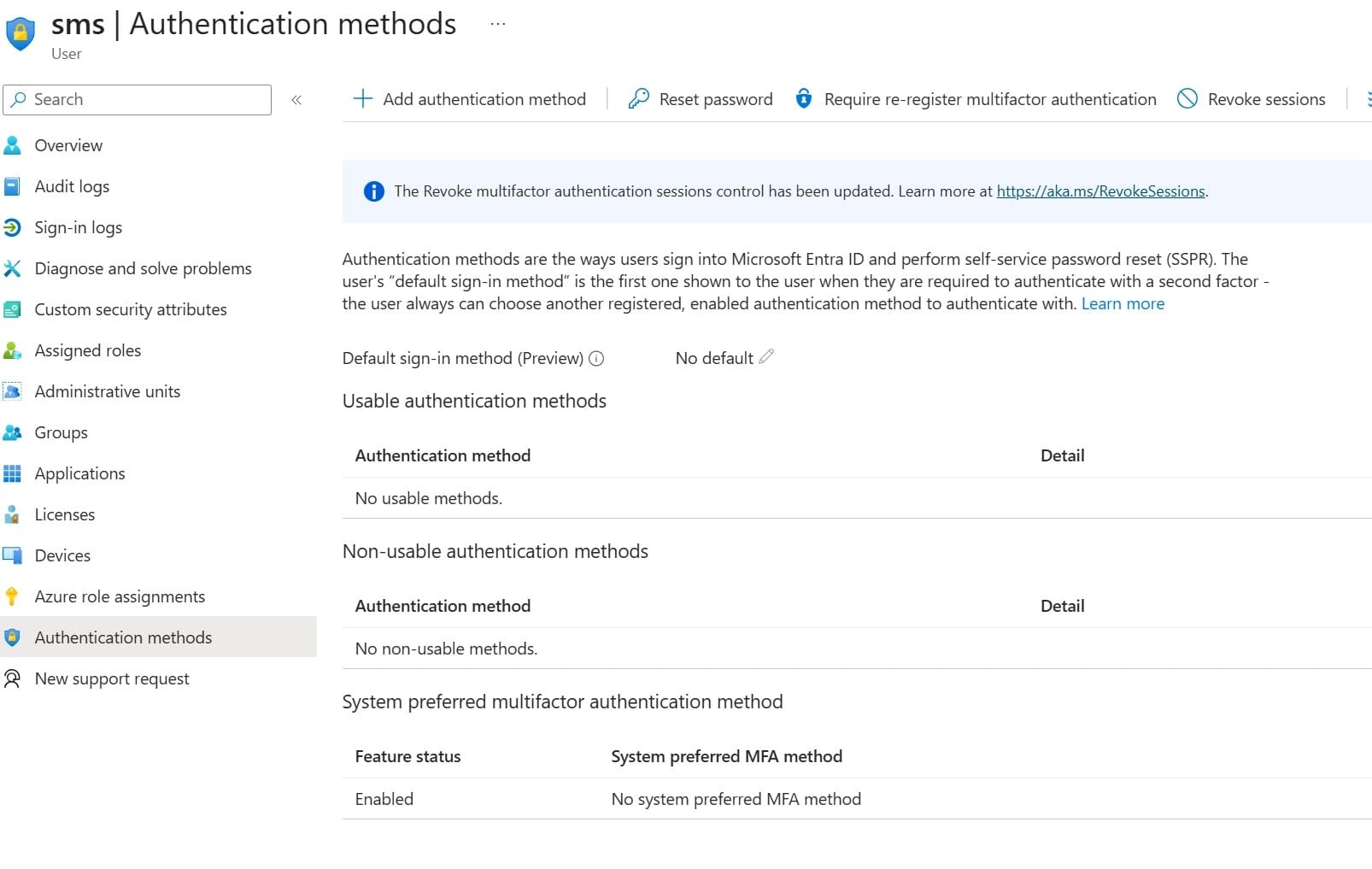
The guest then accesses a resource in my tenant, Entra asks for MFA and the guest completes it by text message.
The sign-in log in my tenant shows the home tenant, the resource tenant and, under Authentication Details, Text message. A method I disabled, used by a user who has nothing registered with me.
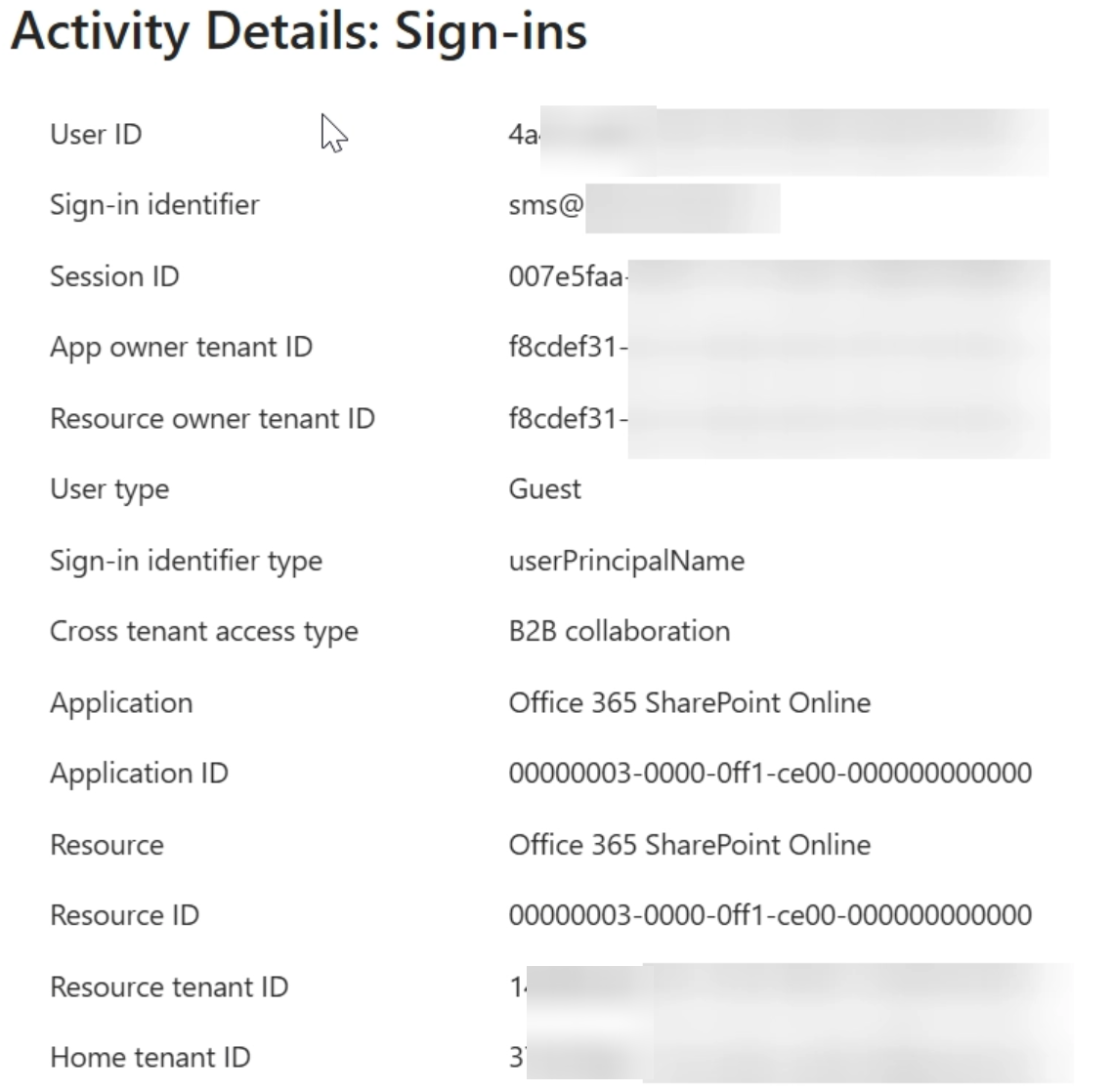
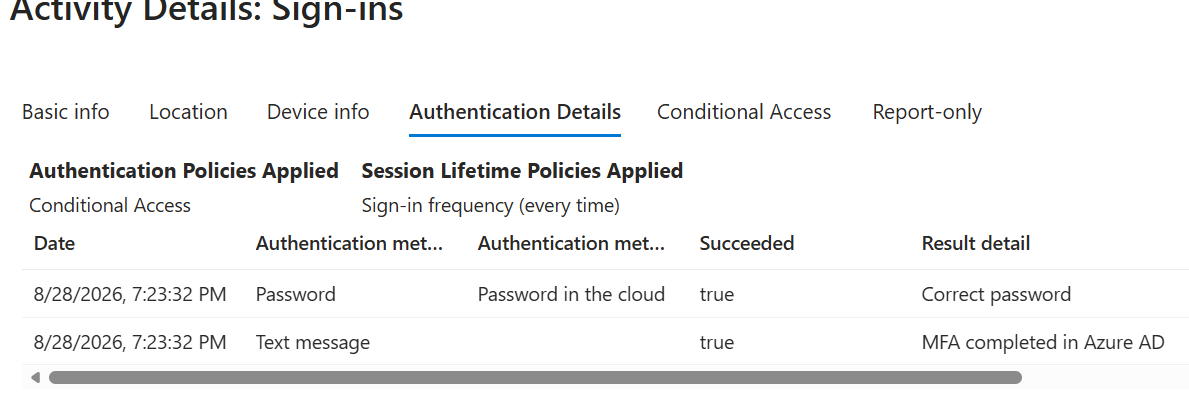
This is expected. With MFA trust enabled, when MFA is required and not yet satisfied, Entra issues the challenge in the user's home tenant. The home tenant decides which methods are available there. My own policy never enters the picture.
Who your policy actually covers
| Population | Where MFA runs | Does disabling SMS in your tenant help? |
|---|---|---|
| Your own members | Your tenant | Yes |
| External Entra user, MFA trust enabled | Home tenant | No |
| External Entra user, MFA trust disabled | Your tenant | Yes |
| Microsoft account, Google, SAML/WS-Fed, email one-time passcode | Your tenant, always | Yes |
The second row is where people get caught. It is also the most common setup. Trusting MFA spares your guests a second registration. It also hands the method policy to the partner.
The last row matters too. For external users who do not authenticate with Microsoft Entra ID, the resource tenant is always responsible for MFA. Those users are fully in your scope whatever your trust settings say.
The only lever on your side
For guests whose MFA runs in their home tenant, your authentication methods policy is irrelevant. Conditional Access authentication strength is not. Replace the plain require MFA grant with a strength that excludes SMS and voice call. The home tenant claim is then rejected unless the user authenticated with an accepted method.
Two warnings before you turn it on.
It blocks, it does not nudge. Entra sends the user back to register an acceptable method in their home tenant. If that tenant only allows SMS the user cannot register anything else and loses access. You have no way to make a partner enable a method. Run the policy in report-only mode first and look at who would have failed.
It does not cover every external user. Authentication strength only applies to external users who authenticate with Microsoft Entra ID. For email one-time passcode, SAML/WS-Fed, Google federation and Microsoft personal accounts, keep the classic require MFA grant control.
What a guest is actually left with
The methods an external user may use depend on where MFA happens. The list is shorter in your tenant than in theirs.
| Method | Home tenant | Resource tenant |
|---|---|---|
| Text message, voice call | Yes | Yes, until the retirement |
| Microsoft Authenticator push | Yes | Yes |
| OATH software token (any TOTP app) | Yes | Yes |
| Authenticator phone sign-in, OATH hardware token, FIDO2 security key, Windows Hello for Business, certificate-based authentication | Yes | No |
Read the right-hand column again. A guest completing MFA in your tenant cannot use a passkey, a security key or a certificate. Once SMS and voice call are gone that population has two options left: Microsoft Authenticator push or an OATH software token.
This is what the passkey messaging leaves out. Guests are in scope of the retirement. Passkey support for guest users is not there yet. And even once it lands, the table above still governs a guest authenticating in your tenant. For contractors and partners who have no reason to install a Microsoft app, plan on a TOTP application.
How to check your own tenant
Two views. You need both.
The sign-in logs tell you what happened during the retention window.
SigninLogs
| where HomeTenantId != "" and HomeTenantId != ResourceTenantId
| mv-expand AuthDetail = todynamic(AuthenticationDetails)
| extend Method = tostring(AuthDetail.authenticationMethod),
         Detail = tostring(AuthDetail.authenticationStepResultDetail)
| where isnotempty(Method)
| summarize Count = count() by UserPrincipalName, UserType, CrossTenantAccessType, Method, Detail
| sort by Count desc
The registered methods tell you what is still sitting on the object, including for users who have not signed in recently. A guest with no method registered in your tenant authenticates entirely elsewhere. A guest with a phone method registered in your tenant is in your retirement scope.
Do not conclude from the logs alone. A user can be absent from the window and still carry a phone number registered three years ago.
Don't forget SSPR
The retirement applies across Entra, and that includes self-service password reset. SMS and voice call will no longer be available as SSPR verification options either, unless you configure a telecom provider through the Security Store.
Microsoft has also indicated that support for password change for users who sign in with a passwordless method is planned, with more details to come. If your SSPR flows currently rely on the mobile phone option for a large part of your population, this needs to be part of the same project, not an afterthought.
Source: https://learn.microsoft.com/en-us/entra/identity/authentication/concept-sms-voice-retirement-faq
What administrators should do now
Do not wait until 2027.
If your tenant still relies on SMS or voice MFA, start by identifying the impacted users and authentication method usage.
Start with Global Administrators and emergency access accounts
Global Administrators get until July 1, 2027. Do not use that delay. These are the accounts you least want stuck on a blocking prompt, and moving them first gives you a tested path before the rest of the tenant.
Emergency access accounts need their own check. They should never depend on a phone. Microsoft recommends phishing-resistant methods for them, such as FIDO2 passkeys or certificate-based authentication. If a break-glass account still relies on SMS or voice, fix it now.
Source: https://learn.microsoft.com/en-us/entra/identity/role-based-access-control/security-emergency-access
Understand the three different populations
This is where most inventories go wrong. There are three distinct questions, and they require three different tools:
- Who is in scope of the
smsandvoicepolicies (AMP or legacy per-user MFA settings)? This is the only criterion that triggers the September 1, 2026 auto-enablement. - Who has actually registered a phone number as an authentication method?
- Who actually uses SMS or voice call to authenticate?
A sign-in log query only answers the third question. It tells you who used the method, not who is enabled for it, and not who is registered for it. Someone in the scope of the sms policy who never uses SMS will not appear in the results and will still be impacted.
Identify who is in policy scope
Microsoft publishes a PowerShell script for this: https://github.com/microsoft/entra-sms-voice-usage-analyzer
Required role: Global Reader, Authentication Policy Administrator or Security Reader. Required Graph scopes: Policy.Read.All and Group.Read.All.
Install-Module Microsoft.Graph.Authentication -Scope CurrentUser
Install-Module Microsoft.Graph.Identity.SignIns -Scope CurrentUser
Install-Module Microsoft.Graph.Groups -Scope CurrentUser

.\Get-SmsVoicePolicyUsers.ps1 -TenantId "contoso.onmicrosoft.com"
The script reads the registration campaign state (a value of default means Microsoft managed), reads the sms and voice authentication method configurations, resolves the included and excluded targets to group display names, exports a CSV named SmsVoicePolicyTargets_<timestamp>.csv, and prints an impact summary.
How to read the output: an SMS state or Voice state of enabled combined with Include: ALL USERS means your entire tenant, minus exclusions, will be auto-enabled for passkeys on September 1. Any non-empty scope means you are in scope.
What the script does not do, and what you still have to do yourself:
- It does not expand group membership. You get a scope, not a nominative list of users.
- It does not cover legacy per-user MFA settings, which are in scope of the change.
- It does not measure any actual usage.
Check the scope yourself, without the script
If you prefer to check it yourself without the script:
Connect-MgGraph -Scopes "Policy.Read.All"

foreach ($m in "sms","voice") {
    $c = Invoke-MgGraphRequest -Method GET -Uri "https://graph.microsoft.com/beta/policies/authenticationMethodsPolicy/authenticationMethodConfigurations/$m" -OutputType PSObject
    "=== $m : $($c.state) ==="
    "include:"; $c.includeTargets | ConvertTo-Json -Depth 3
    "exclude:"; $c.excludeTargets | ConvertTo-Json -Depth 3
}
If both come back as disabled, nobody is in scope, nothing happens to your tenant on September 1, and the opt-out described below is unnecessary. Check this before doing anything else. A lot of admins will apply the opt-out without ever verifying whether they are actually affected.
Identify who has registered a phone number
Use the User registration details report in the Entra portal: https://entra.microsoft.com/#view/Microsoft_AAD_IAM/AuthenticationMethodsMenuBlade/~/UserRegistrationDetails/fromNav/Identity
The Authentication methods activity report in the Entra admin center gives the same picture without a script. Or through Microsoft Graph, for a nominative export:
Connect-MgGraph -Scopes "AuditLog.Read.All","UserAuthenticationMethod.Read.All"

Get-MgReportAuthenticationMethodUserRegistrationDetail -All | Where-Object { $_.MethodsRegistered -contains "mobilePhone" } | Select-Object UserPrincipalName, IsMfaRegistered, IsPasswordlessCapable, @{n="Methods";e={$_.MethodsRegistered -join ","}} | Export-Csv .\PhoneRegisteredUsers.csv -NoTypeInformation
Measure actual usage
Three ways to do this, depending on what you have available. Pick the one that matches your environment.
With PS365
The quickest route. My PS365 module wraps the sign-in log query, handles paging and date conversion and exposes the authentication details in a usable form:
Install-Module PS365 -Scope CurrentUser
Import-Module PS365

Get-MgAuditLogSigninInfo -TimeRange Maximum -SmsVoiceMFASignInsOnly -ExportToExcel
TimeRange Maximum means the full retention window available in Entra ID, which is 30 days with an Entra ID P1 or P2 license and 7 days otherwise.
With Microsoft Graph only
If you would rather not add a module, query the beta endpoint directly. Note that choice: the v1.0 list endpoint does not reliably return the authenticationDetails property, which is exactly the one you need here.
Connect-MgGraph -Scopes "AuditLog.Read.All"

$days = 1
$since = (Get-Date).AddDays(-$days).ToUniversalTime().ToString("yyyy-MM-ddTHH:mm:ssZ")
$uri = "https://graph.microsoft.com/beta/auditLogs/signIns?`$filter=createdDateTime ge $since&`$top=999"
$csvPath = ".\SmsVoiceUsageByUser_$(Get-Date -Format 'yyyyMMdd_HHmmss').csv"

[System.Collections.Generic.List[PSCustomObject]]$signInLogList = @()

while ($uri) {
    $response = Invoke-MgGraphRequest -Method GET -Uri $uri -OutputType PSObject
    if ($response.value) {
        $signInLogList.AddRange([PSCustomObject[]]$response.value)
    }
    Write-Host "Retrieved $($signInLogList.Count) records"
    $uri = $response.'@odata.nextLink'
}

[System.Collections.Generic.List[PSCustomObject]]$phoneSignInList = @()

foreach ($signIn in $signInLogList) {
    $phoneMethods = @($signIn.authenticationDetails | Where-Object { $_.authenticationMethod -match "Text message|SMS|Voice call|Phone call approval" })
    if ($phoneMethods.Count -eq 0) { continue }

    $phoneSignIn = [PSCustomObject][ordered]@{
        UserPrincipalName = $signIn.userPrincipalName
        CreatedDateTime   = $signIn.createdDateTime
        ErrorCode         = $signIn.status.errorCode
        AppDisplayName    = $signIn.appDisplayName
        IPAddress         = $signIn.ipAddress
        Methods           = ($phoneMethods.authenticationMethod | Sort-Object -Unique) -join ","
    }

    $phoneSignInList.Add($phoneSignIn)
}

$phoneSignInList | Group-Object UserPrincipalName | ForEach-Object {
    [PSCustomObject][ordered]@{
        UserPrincipalName = $_.Name
        Attempts          = $_.Count
        Success           = ($_.Group | Where-Object { $_.ErrorCode -eq 0 }).Count
        LastUsed          = ($_.Group.CreatedDateTime | Measure-Object -Maximum).Maximum
        Methods           = ($_.Group.Methods -split "," | Sort-Object -Unique) -join ","
    }
} | Sort-Object LastUsed -Descending | Export-Csv -Path $csvPath -NoTypeInformation -Encoding UTF8
Two things to expect. On an active tenant, 30 days of sign-ins run into hundreds of thousands of records, and the filtering on authenticationDetails happens client-side because that property is not filterable server-side. Start with a smaller window for a first run. Throttling is also likely on large volumes, so add a Start-Sleep inside the loop if you get 429 responses.
With Log Analytics or Sentinel
If your sign-in logs are exported to a workspace, KQL is the better option, because you are no longer limited to the Entra retention window. Workspace retention is what applies, and it can go well beyond 30 days.
Check what you actually have before choosing a window:
SigninLogs
| summarize Oldest = min(TimeGenerated), Newest = max(TimeGenerated)
Then adjust lookback accordingly:
let lookback = 90d;
SigninLogs
| where TimeGenerated > ago(lookback)
| mv-expand AuthDetail = parse_json(AuthenticationDetails)
| extend AuthMethod = tostring(AuthDetail.authenticationMethod)
| where AuthMethod has_any ("Text message", "SMS", "Voice call", "Phone call approval")
| summarize Attempts = count(), Success = countif(ResultType == 0), LastUsed = max(TimeGenerated), Methods = make_set(AuthMethod) by UserPrincipalName
| sort by LastUsed desc
Keep these limitations in mind, whichever route you take:
- Filtering on successful sign-ins only would hide failed attempts, and a user failing an SMS challenge is just as much in scope. The queries above count both.
- The
authenticationMethodvalues are not stable across scenarios (SMS,Text message,Voice call,Phone call approval (Authentication phone),Phone call approval (Office phone)), so a pattern match is safer than an exact list. - A diagnostic setting does not backfill. If you enabled the export to Log Analytics two months ago, you have two months of history, whatever the retention setting says.
- Quarterly or seasonal users may simply not show up in any window you can query. Absence from the usage report is not proof that nobody needs the method.
Cross-referencing the three populations is what gives you an action plan. Users present in the policy scope export but absent from the usage report are the ones you can move out of the SMS/Voice scope first.
Remove users from the SMS and voice scope
This is the most effective lever, and it must be pulled before September 1, 2026.
"Move users out of SMS or Voice in AMP" can be misleading. The Authentication Methods Policy is not a container users are enrolled into. It is a set of per-method configurations, each with a state and its own includeTargets and excludeTargets. A user is in scope for SMS simply because the sms configuration is enabled and they fall within its include targets without being excluded. Moving users out therefore means one of three things: disabling the method, narrowing its include targets, or adding the users to its exclude targets. There is no separate operation.
Check policyMigrationState on the policy first. A value of migrationComplete means legacy per-user MFA settings are no longer a separate source of scope, and everything is decided in the AMP. Otherwise both need to be handled.
(Invoke-MgGraphRequest -Method GET -Uri "https://graph.microsoft.com/beta/policies/authenticationmethodspolicy" -OutputType PSObject).policyMigrationState
In the Entra admin center, go to Entra ID > Authentication methods > Policies, then open SMS and Voice call. You can:
- Set the method state to
Disabledif no one needs it, - or remove the targeted groups and users,
- or move the relevant populations into the exclusion list.
Same operations in PowerShell
The same thing in PowerShell, disabling both methods entirely:
Connect-MgGraph -Scopes "Policy.ReadWrite.AuthenticationMethod"

foreach ($m in "sms","voice") {
    $body = @{ "@odata.type" = "#microsoft.graph.${m}AuthenticationMethodConfiguration"; id = $m; state = "disabled" } | ConvertTo-Json -Depth 3
    Invoke-MgGraphRequest -Method PATCH -Uri "https://graph.microsoft.com/beta/policies/authenticationMethodsPolicy/authenticationMethodConfigurations/$m" -Body $body -ContentType "application/json"
}
Or narrowing the scope to a single group:
$groupId = "00000000-0000-0000-0000-000000000000"

$body = @{
    "@odata.type" = "#microsoft.graph.smsAuthenticationMethodConfiguration"
    id = "sms"
    state = "enabled"
    includeTargets = @(
        @{ targetType = "group"; id = $groupId; isRegistrationRequired = $false }
    )
} | ConvertTo-Json -Depth 4

Invoke-MgGraphRequest -Method PATCH -Uri "https://graph.microsoft.com/beta/policies/authenticationMethodsPolicy/authenticationMethodConfigurations/sms" -Body $body -ContentType "application/json"
includeTargets is replaced as a whole, not merged. Back up the current configuration before patching:
Invoke-MgGraphRequest -Method GET -Uri "https://graph.microsoft.com/beta/policies/authenticationMethodsPolicy/authenticationMethodConfigurations/sms" -OutputType PSObject | ConvertTo-Json -Depth 5 | Out-File .\sms-policy-backup.jsonOrder matters. Run the inventory first, or you will cut SMS for users who have nothing else. Users whose phone is their only registered method must register something else beforehand, otherwise they end up with no usable MFA at their next sign-in.
Users removed from the scope before September 1 are not auto-enabled for passkeys and are not automatically brought into the Microsoft managed registration campaign.
If you need more time: the temporary opt-out
A temporary opt-out covers the September 1, 2026 to February 1, 2027 period. It delays the automatic passkey enablement and the registration campaign rollout while you complete transition activities, such as configuring a customer-managed telecom provider or migrating users to another method.
It requires the Microsoft Graph permission Policy.ReadWrite.AuthenticationMethod:
PATCH https://graph.microsoft.com/beta/policies/authenticationmethodspolicy
Content-Type: application/json

{
   "optOutSettings": {
     "passkeyDynamicMigration": true
   }
}
In PowerShell:
Connect-MgGraph -Scopes "Policy.ReadWrite.AuthenticationMethod"

$body = @{ optOutSettings = @{ passkeyDynamicMigration = $true } } | ConvertTo-Json -Depth 3

Invoke-MgGraphRequest -Method PATCH -Uri "https://graph.microsoft.com/beta/policies/authenticationmethodspolicy" -Body $body -ContentType "application/json"
To check the current value:
$policy = Invoke-MgGraphRequest -Method GET -Uri "https://graph.microsoft.com/beta/policies/authenticationmethodspolicy" -OutputType PSObject

if ($null -eq $policy.optOutSettings) {
    "optOutSettings not set - tenant is NOT opted out"
} else {
    $policy.optOutSettings | ConvertTo-Json -Depth 3
}
optOutSettings appears in the policy schema but comes back as null until it has been written at least once. A null value is the default state and means the tenant is not opted out. Setting passkeyDynamicMigration back to false reverts to standard behavior.
Two warnings. First, this only buys time until the enforcement date of each population, February 1, 2027 for most users and July 1, 2027 for Global Administrators and external users: standard migration and enforcement timelines apply from that date regardless of the setting, and there is no opt out for either enforcement date. Second, you may read elsewhere that simply moving the registration campaign out of the Microsoft managed state is enough to defer the impact. That is not what Microsoft documents. The registration campaign and the sms and voice method configurations are two separate objects, and the campaign is downstream of the scope, not the other way around. The two documented levers are removing users from the SMS/Voice scope, and the passkeyDynamicMigration opt-out. Do not rely on the campaign state alone.
One side effect worth anticipating: if you already run a registration campaign for another method, Microsoft will overwrite that configuration on September 1 for tenants in scope, including its state and its targeted method.
Choose your passkey types deliberately
Microsoft Entra ID supports two categories of passkeys, and the choice has a direct impact on your helpdesk load:
- Device-bound passkeys: passkey in Microsoft Authenticator, Entra Passkey on Windows, FIDO2 hardware security keys. The credential is created and stored on one device and cannot be transferred to a new device, even when Microsoft Authenticator backup is configured. Expect re-registration calls at every device refresh, loss or theft.
- Synced passkeys: stored in a platform credential manager such as iCloud Keychain or Google Password Manager, and synced across the user's devices. A pragmatic option for lower-risk populations, and a way to reduce the support overhead of device-bound credentials.
Microsoft recommends device-bound passkeys for administrators and highly privileged users, and synced passkeys for other users. Passkey profiles let you stage synced passkeys for part of the tenant first.
Also worth knowing from the passkey FAQ before you choose:
- Admins cannot see or control which devices hold a synced passkey. If you need a strict device boundary, use device-bound passkeys.
- Passkeys in Microsoft Authenticator: one passkey per account, Microsoft Entra ID accounts only. Android needs a Secure Element or TEE, Android 14 depends on the device maker and Android 15 is recommended. A work profile needs its own Authenticator instance, and changing the device PIN or biometrics invalidates the passkey.
- Passkeys do not expire. Monitor them through the audit and sign-in logs; an admin can delete a user's passkey from their authentication methods or through Graph.
- Passkeys are not available in Microsoft Entra operated by 21Vianet.
Source: https://learn.microsoft.com/en-us/entra/identity/authentication/passkey-faq
Prepare the rollout and the bootstrap
- Validate supported devices, OS versions, browsers, applications, VDI scenarios, user populations, onboarding flows and helpdesk processes. This is usually where the hidden complexity lives, and where a "simple" uplift turns into a six-month project.
- Make sure Passkey (FIDO2) is enabled as an authentication method and that your SMS and voice users are included in a passkey-enabled authentication methods policy before you drive any registration.
- Be careful with Conditional Access. Enforcing phishing-resistant authentication too broadly can break the passkey registration flow itself, since the user has no phishing-resistant credential yet. Plan a bootstrap path, typically a Temporary Access Pass, and test it before enforcing.
- Configure the registration campaign yourself rather than waiting for the automatic rollout. With the Authentication Policy Administrator role, go to Entra ID > Authentication methods > Registration campaign, set State to Microsoft Managed and target the security group of SMS and voice users you built during the inventory.
When the passkey nudge does not fire
The nudge is not evaluated per user. It is evaluated per device and browser combination. A user with a Windows Hello for Business credential is not nudged on Windows with Chrome, but is nudged on a Mac with Chrome, because that credential does not apply there. Expect the question from your helpdesk.
Passkey profile restrictions no longer switch the nudge off. Under Microsoft managed, unrestricted, synced-only, device-bound-only, attestation-enforced and AAGUID-restricted profiles are all eligible, and one eligible profile is enough:
- unrestricted, synced only or device-bound only: evaluated per device and browser, as described above, for the passkey type the profile allows
- attestation enforced: eligible, and once the user registers one eligible passkey the nudge stops on every platform
- AAGUID restrictions: eligible when the list holds at least one AAGUID of iCloud Keychain, Google Password Manager, Microsoft Authenticator or Microsoft Entra passkey on Windows, with the same rule: one eligible passkey stops the nudge everywhere
- an AAGUID list with none of those: not eligible, so the user is not nudged
Read that against the passkey types section above: restricting privileged users to device-bound passkeys does not take them out of the campaign. Setting the campaign to Enabled instead of Microsoft managed skips this profile check altogether.
The method a Microsoft managed campaign targets follows one rule: passkeys when the included users are enabled for passkeys, Microsoft Authenticator otherwise.
A passkey campaign has two prerequisites, and the second one is easy to miss:
- the passkey (FIDO2) method must be enabled in the authentication methods policy
- the Allow self-service setup toggle must be enabled in that same method configuration
Which credential suppresses the nudge, by platform
A user needs at least one matching credential for the nudge to be suppressed on that device and browser. This per-platform rule applies to unrestricted, synced-only and device-bound-only profiles; with attestation or an AAGUID list, one eligible passkey anywhere stops the nudge. This is the table to keep at hand when someone reports being nudged on one machine and not on another.
| Credential | Windows + Chrome | Windows + other | Mac + Chrome | Mac + other | iOS | Android |
|---|---|---|---|---|---|---|
| Windows Hello for Business | yes | yes | no | no | no | no |
| Microsoft Entra passkey on Windows | yes | yes | no | no | no | no |
| Google Password Manager | yes | no | yes | no | no | yes |
| iCloud Keychain, including Managed | no | no | yes | yes | yes | no |
| Mac Platform single sign-on | no | no | yes | yes | no | no |
| Samsung Pass | no | no | no | no | no | yes |
| Passkey in Microsoft Authenticator | no | no | no | no | yes | yes |
| Any cross-platform provider, such as a security key | yes | yes | yes | yes | yes | yes |
Linux is absent from the table on purpose: FIDO2 passkeys are not available there, so Linux users are never nudged.
Other behaviours worth knowing before September 1:
- a campaign targets one method at a time. If you run an Authenticator campaign today, switching to passkeys stops it.
- under Microsoft managed the snooze period is one day and snoozes are unlimited, and neither is configurable.
- under Microsoft managed you define which users are included and excluded. Anyone in scope who completes MFA is eligible, and the retirement page recommends targeting the security group of your SMS and voice users.
- guests are not nudged for passkeys, passkey support for guest users is not available yet.
- the nudge does not fire inside an SSO session, when a Conditional Access policy blocks the Register security information page, when a terms of use screen appears, or with Conditional Access custom controls. It only fires on an interactive sign-in that completes Microsoft Entra MFA, never in out-of-box experiences, Windows Settings embedded views or native Android apps, and any Conditional Access policy that governs security info registration (internal network only, for example) applies first.
Source: https://learn.microsoft.com/en-us/entra/identity/authentication/how-to-mfa-registration-campaign
Plan communication
Users need to understand what a passkey is, why they are being asked to register one, and what will change during sign-in. Microsoft recommends a phased plan: awareness, then action, then reminders for users who have not registered yet.
End-user communication templates are available at https://aka.ms/mfatemplates
Scope your messaging to the security group of SMS and voice users, so the right people hear from you at the right time.
Handle exceptions
Some users, shared scenarios, or operational accounts may require a different transition path. Document these cases early, and document the actual requirement (which regulation, which scenario) if you plan to justify a telecom provider.
Avoid making telecom fallback the default strategy
The Microsoft Security Store option is useful for organizations with genuine regulatory or operational constraints, but it should not replace the move to phishing-resistant authentication. It carries a recurring per-message cost and keeps a phishable method alive in your environment. If you go that route, treat it as a project of its own. Stand up the carrier contract through the marketplace flow, then test with a pilot group before moving production users onto it. You are adding a third party contract, a per message bill and a delivery channel you do not control.
Key takeaway
This is not just another MFA configuration change.
Microsoft is clearly moving Entra authentication away from telecom-based MFA and toward phishing-resistant methods by default.
If SMS and voice are still part of your MFA strategy, the migration window is now visible:
- September 1, 2026: passkeys become the default experience, and users in the scope of the
smsandvoicepolicies are auto-enabled and nudged. - February 1, 2027: native SMS and voice MFA are discontinued for all users except Global Administrators and external users, with a blocking registration prompt and no opt out.
- July 1, 2027: the same applies to Global Administrators and external users. Do not wait for that date to move them.
Two dates matter more than the deadline itself: the day you finish your inventory, and the day you decide who stays in the SMS/Voice scope after September 1. The right move is to start preparing passkey adoption now, before this becomes an urgent remediation project.
References
- https://learn.microsoft.com/en-us/entra/identity/authentication/concept-sms-voice-retirement
- https://learn.microsoft.com/en-us/entra/identity/authentication/concept-sms-voice-retirement-faq
- https://github.com/microsoft/entra-sms-voice-usage-analyzer
- https://learn.microsoft.com/en-us/entra/identity/authentication/how-to-deploy-phishing-resistant-passwordless-authentication
- https://learn.microsoft.com/en-us/entra/identity/authentication/concept-authentication-passkeys-fido2
- https://github.com/bastienperez/PS365
- https://learn.microsoft.com/en-us/entra/identity/authentication/phone-providers-faq
- https://learn.microsoft.com/en-us/entra/identity/role-based-access-control/security-emergency-access
- Message Center: MC1426371, MC1459133