
Refresh gMSA permissions for Entra Cloud Sync

Table of Contents
No matching heading
Problem
If you add or remove Active Directory permissions on the gMSA account used by Microsoft Entra Cloud Sync provAgentgMSA ,the agent may not pick up the changes immediately.
This can affect any scenario where the provisioning agent uses this gMSA account to access Active Directory, such as:
- Microsoft Entra Cloud Sync
- Group provisioning / group writeback to Active Directory
- Workday inbound provisioning to Active Directory
The service continues running with its existing security context, so it may not see newly granted permissions, or may continue behaving as if removed permissions were still available.
When using outdated Active Directory permissions on the gMSA account, the provisioning agent may return the HybridSynchronizationActiveDirectoryInsufficientAccessRights error even after permissions have been updated.
Solution
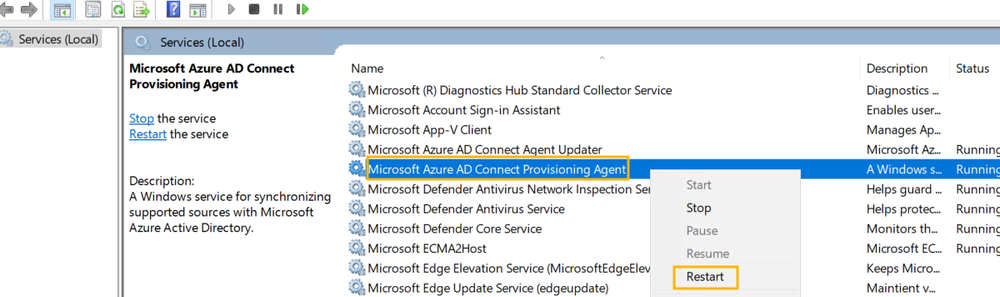
To force the provisioning agent to reload the gMSA security context, restart the AADConnectProvisioningAgent (Microsoft Azure AD Connect Provisioning service).
Using PowerShell with local administrator privileges:
Restart-Service AADConnectProvisioningAgentOr from the Services console:
- Open
services.msc - Find Microsoft Azure AD Connect Provisioning
- Restart the service
After the service restarts, the agent runs with the refreshed security context of the gMSA account and should take the updated Active Directory permissions into account.