
KQL query examples for Microsoft Entra ID with Log Analytics (updated September 2026)

Table of Contents
No matching heading
Before running these queries
These queries use Microsoft Entra ID logs stored in a Log Analytics workspace. Make sure your Entra ID diagnostic settings are configured to send the required logs, including SigninLogs, AuditLogs, and AADNonInteractiveUserSignInLogs, to the workspace. If a query returns no results, check the diagnostic settings and available data before troubleshooting the query itself.
The amount of historical data available depends on your Log Analytics workspace retention settings, not the default Entra ID retention period.
Unless a query explicitly specifies a time period, use the Time range selector in Log Analytics to define the period you want to analyze.
Entra ID - Sign-ins
List sign-ins
SigninLogs
// Query only successful sign-ins
| where ResultType == 0
List sign-ins from specific IP addresses
let IPs = datatable(IPAddress: string) ["xxxx", "xxx"];
IPs
| join kind=leftouter (SigninLogs | summarize SignInCount = count() by IPAddress) on IPAddress
| project IPAddress, SignInCount = iff(isnull(SignInCount), 0, SignInCount)
List sign-ins from IP addresses outside France
let homeCountry = "FR";
SigninLogs
| where tostring(LocationDetails.countryOrRegion) != homeCountry
List sign-ins grouped by IP address, user, location, and first/last seen
let users = dynamic(["xxx@domain", "yyy@domain"]);
SigninLogs
| where UserPrincipalName in~ (users)
| summarize Connections = count(), FirstSeen = min(TimeGenerated), LastSeen = max(TimeGenerated) by
    User = UserPrincipalName,
    IP = IPAddress,
    Country = tostring(LocationDetails.countryOrRegion),
    City = tostring(LocationDetails.city)
List sign-ins without MFA using any authentication method
This query lists all successful single-factor sign-ins regardless of the authentication method used. If the AuthenticationDetails array is empty (often the case for B2B scenarios), the method falls back to the CrossTenantAccessType value.
SigninLogs
// Only successful sign-ins
| where ResultType == 0
// Exclude Windows and Auth Broker apps
| where AppDisplayName !in ("Windows Sign In", "Microsoft Authentication Broker")
// Parse AuthenticationDetails array
| extend details = parse_json(AuthenticationDetails)
// Extract authenticationMethod from first step if available, else use CrossTenantAccessType
| extend authenticationMethod = iif(array_length(details) > 0, tostring(details[0].authenticationMethod),
                          iif(isnotempty(CrossTenantAccessType), tostring(CrossTenantAccessType), ""))
// Keep only single-factor authentication attempts
| where AuthenticationRequirement == "singleFactorAuthentication"
// Exclude methods already satisfied (e.g. SSO)
| where authenticationMethod != "Previously satisfied"
// Add UserName and UPN suffix for entity correlation
| extend UserName = split(UserPrincipalName, "@")[0], UserUPNSuffix = split(UserPrincipalName, "@")[1]
// Extract device information
| extend DeviceId = tostring(DeviceDetail.deviceId)
| extend DeviceOperatingSystem = tostring(DeviceDetail.operatingSystem)
// Project and reorder columns
| project-reorder TimeGenerated, UserPrincipalName, UserName, UserUPNSuffix, AuthenticationRequirement, authenticationMethod, AuthenticationProtocol, DeviceId, DeviceOperatingSystem
List sign-ins without MFA using password authentication only
This version filters sign-ins strictly using the "Password" method. It only includes records where AuthenticationDetails is not empty and the first step is clearly marked as "Password".
SigninLogs
// Only successful sign-ins
| where ResultType == 0
// Exclude Windows and Auth Broker apps
| where AppDisplayName !in ("Windows Sign In", "Microsoft Authentication Broker")
// Parse AuthenticationDetails array
| extend details = parse_json(AuthenticationDetails)
// Extract authenticationMethod from first step if available, else use CrossTenantAccessType
| extend authenticationMethod = iif(array_length(details) > 0, tostring(details[0].authenticationMethod),
                          iif(isnotempty(CrossTenantAccessType), tostring(CrossTenantAccessType), ""))
// Keep only single-factor authentication attempts
| where AuthenticationRequirement == "singleFactorAuthentication"
// Limit to password only authentication
| where authenticationMethod == "Password"
// Add UserName and UPN suffix for entity correlation
| extend UserName = split(UserPrincipalName, "@")[0], UserUPNSuffix = split(UserPrincipalName, "@")[1]
// Extract device information
| extend DeviceId = tostring(DeviceDetail.deviceId)
| extend DeviceOperatingSystem = tostring(DeviceDetail.operatingSystem)
// Project and reorder columns
| project-reorder TimeGenerated, UserPrincipalName, UserName, UserUPNSuffix, AuthenticationRequirement, authenticationMethod, AuthenticationProtocol, DeviceId, DeviceOperatingSystem
List sign-ins without MFA using password authentication only, excluding trusted network locations and compliant devices
SigninLogs
  // Query only successful sign-ins
  | where ResultType == 0
  // Ignore login to Windows and Microsoft Authentication Broker
  | where AppDisplayName != "Windows Sign In" and AppDisplayName != "Microsoft Authentication Broker"  // Limit to password only authentication
  // Limit to password only authentication
  | extend authenticationMethod = tostring(parse_json(AuthenticationDetails)[0].authenticationMethod)
  | where authenticationMethod == "Password"
  // Limit to non MFA sign-ins
  | where AuthenticationRequirement == "singleFactorAuthentication"
  // Remove all sign-ins coming from either a trusted network location or a compliant device
  | where NetworkLocationDetails == "[]" and DeviceDetail.isCompliant != true
  // Add UserName and UserUPNSuffix for strong entity match
  | extend UserName = split(UserPrincipalName,'@',0)[0], UserUPNSuffix = split(UserPrincipalName,'@',1)[0]
  | extend DeviceId = tostring(DeviceDetail.deviceId)
  | extend DeviceOperatingSystem = tostring(DeviceDetail.operatingSystem)
  | project-reorder TimeGenerated, UserPrincipalName, AuthenticationRequirement, authenticationMethod, AuthenticationProtocol
List sign-ins with MFA
SigninLogs
  // Query only successful sign-ins
  | where ResultType == 0
  // Ignore login to Windows
  | where AppDisplayName != "Windows Sign In"
  // Limit to password only authentication
  | extend authenticationStepRequirement = tostring(parse_json(AuthenticationDetails)[0].authenticationStepRequirement)
  | where AuthenticationRequirement == "multiFactorAuthentication"
  | project TimeGenerated , UserPrincipalName
List sign-ins with MFA from specific IP addresses
let allowedIPs = dynamic(["xxx.xxx.xxx.xxx", "yyy.yyy.yyy.yyy"]);
SigninLogs
  // Query only successful sign-ins
  | where ResultType == 0
  // Ignore login to Windows
  | where AppDisplayName != "Windows Sign In"
  // Limit to password only authentication
  | extend authenticationStepRequirement = tostring(parse_json(AuthenticationDetails)[0].authenticationStepRequirement)
  | where AuthenticationRequirement == "multiFactorAuthentication"
  | where IPAddress in (allowedIPs)
| summarize count() by UserPrincipalName, IPAddress
List sign-ins with their MFA method
SigninLogs
| where AuthenticationRequirement == "multiFactorAuthentication"
| where ResultType == 0
| extend Step = parse_json(AuthenticationDetails)[1]
| extend MFAMethod = tostring(Step.authenticationMethod)
| where MFAMethod != "Previously satisfied" and isnotempty(MFAMethod)
| project TimeGenerated, UserPrincipalName, AppDisplayName, MFAMethod, IPAddress, ConditionalAccessStatus
Group sign-ins by user and MFA method
SigninLogs
| where AuthenticationRequirement == "multiFactorAuthentication"
| where ResultType == 0
| project UserPrincipalName, AuthenticationDetails
| extend ['MFA Method'] = tostring(parse_json(AuthenticationDetails)[1].authenticationMethod)
| where ['MFA Method'] != "Previously satisfied" and isnotempty(['MFA Method'])
| summarize Count = count() by UserPrincipalName, ['MFA Method']
List sign-ins that used MFA via SMS
SigninLogs
| where ResultType == 0
| extend AuthenticationDetailsArray = parse_json(AuthenticationDetails)
| mv-expand AuthenticationDetailsArray
| where AuthenticationDetailsArray.authenticationMethod == "Text message"
List sign-ins that used MFA via phone call
SigninLogs
| where ResultType == 0
| extend AuthenticationDetailsArray = parse_json(AuthenticationDetails)
| mv-expand AuthenticationDetailsArray
| where AuthenticationDetailsArray.authenticationMethod == "Phone call approval (Authentication phone)"
List sign-ins that used MFA via SMS or phone call
Useful for assessing the impact of the SMS and voice call authentication retirement planned for February 2027. See the dedicated article for more details.
SigninLogs
| where ResultType == 0
| extend AuthenticationDetailsArray = parse_json(AuthenticationDetails)
| mv-expand AuthenticationDetailsArray
| where AuthenticationDetailsArray.authenticationMethod in ("Text message", "Phone call approval (Authentication phone)")
| extend AuthMethod = tostring(AuthenticationDetailsArray.authenticationMethod)
| project TimeGenerated, UserPrincipalName, AuthMethod, AppDisplayName, IPAddress, Location
List phone numbers associated with multiple user accounts
This query identifies phone numbers that have been added to more than one Microsoft Entra ID user account.
It searches the Microsoft Entra audit logs for user update operations, extracts phone numbers from the StrongAuthenticationUserDetails property, and groups the results by phone number. Only phone numbers associated with multiple distinct user accounts are returned. This can help identify shared phone numbers, configuration errors, duplicated authentication methods, or potentially suspicious account changes.
AuditLogs
| where OperationName == "Update user"
| mv-expand TR = TargetResources
| mv-expand MP = TR.modifiedProperties
| where tostring(MP.displayName) == "StrongAuthenticationUserDetails"
| extend UPN = tostring(TR.userPrincipalName)
| extend NewPhone = extract(@"""PhoneNumber"":\s*""([^""]+)""", 1, tostring(MP.newValue))
| where isnotempty(NewPhone)
| summarize Accounts = make_set(UPN), NbAccounts = dcount(UPN) by NewPhone
| where NbAccounts > 1
| sort by NbAccounts desc
Note that this query only analyzes changes available within the retention period of the AuditLogs table. It does not provide a complete inventory of the authentication methods currently registered for each user. Phone numbers are sensitive personal data, so access to the results should be appropriately restricted.
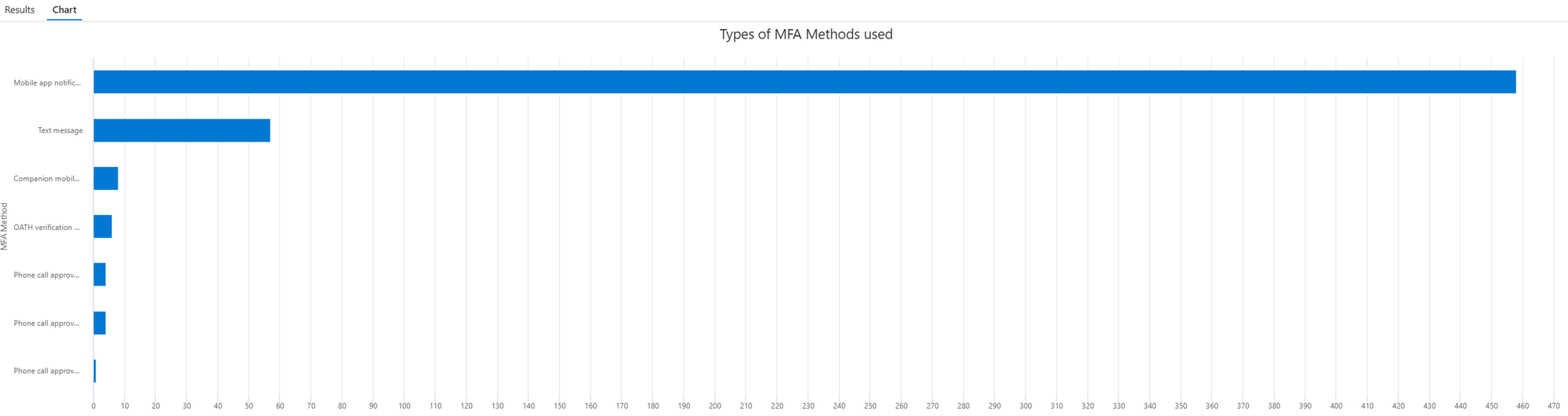
Chart of MFA methods used
For your information, you can also retrieve this data in Entra ID (but it's limited to a maximum of 30 days): https://entra.microsoft.com/#view/Microsoft_AAD_IAM/AuthenticationMethodsMenuBlade/~/AuthMethodsActivity > Usage tab.
SigninLogs
| where AuthenticationRequirement == "multiFactorAuthentication"
| where ResultType == 0
| project AuthenticationDetails
| extend ['MFA Method'] = tostring(parse_json(AuthenticationDetails)[1].authenticationMethod)
| summarize Count=count()by ['MFA Method']
| where ['MFA Method'] != "Previously satisfied" and isnotempty(['MFA Method'])
| sort by Count desc
| render barchart with (title="Types of MFA Methods used")
Result:
List Conditional Access policy usage and status for interactive sign-ins only
SigninLogs
// Additional Toggle to determine CA result for success/failure login
//| where ResultType == "0"
| where ConditionalAccessPolicies != "[]"
| mv-expand ConditionalAccessPolicies
| extend CADisplayName = tostring(ConditionalAccessPolicies.displayName)
| extend CAResult = tostring(ConditionalAccessPolicies.result)
| summarize Count=count() by CADisplayName, CAResult
| sort by CADisplayName asc
List unused Conditional Access policies
SigninLogs
| mv-expand todynamic(ConditionalAccessPolicies)
| extend CAResult=tostring(ConditionalAccessPolicies.result), CAName=tostring(ConditionalAccessPolicies.displayName)
| summarize TotalCount=count(),ResultSet=make_set(CAResult) by CAName
| where not(ResultSet has_any ("success","failure"))
| sort by CAName asc
List successful sign-ins using a specific Conditional Access policy for interactive sign-ins only
Replace xxx with the name of your conditional access policy.
let policyName = "xxx";

SigninLogs
| mv-expand ConditionalAccessPolicies
| where ConditionalAccessPolicies.displayName == policyName
| where tostring(ConditionalAccessPolicies.result) == "success"
| project
    TimeGenerated,
    UserPrincipalName,
    AppDisplayName,
    IPAddress,
    ConditionalAccessPolicyName = ConditionalAccessPolicies.displayName,
    ConditionalAccessResult = ConditionalAccessPolicies.result
List sign-ins affected by report-only Conditional Access policies for interactive sign-ins only
SigninLogs
| mvexpand ConditionalAccessPolicies
| where tostring(ConditionalAccessPolicies["result"]) startswith "reportOnly"
| where tostring(ConditionalAccessPolicies["result"]) != "reportOnlyNotApplied"
| project TimeGenerated,
          UserPrincipalName,
          AppDisplayName,
          PolicyName = tostring(ConditionalAccessPolicies["displayName"]),
          Result = tostring(ConditionalAccessPolicies["result"])
| order by TimeGenerated desc
List sign-in failures and Conditional Access policy status by user for interactive and non-interactive sign-ins
let Interactive = SigninLogs
| where ResultType != 0
| extend UPN = coalesce(UserPrincipalName, tostring(parse_json(Identity)["upn"]))
| extend SignInType = "Interactive"
| extend CAExpanded = iff(isnotempty(ConditionalAccessPolicies), todynamic(ConditionalAccessPolicies), dynamic([{}]))
| mv-expand CAExpanded
| extend CAName = tostring(CAExpanded.displayName), CAResult = tostring(CAExpanded.result);
let NonInteractive = AADNonInteractiveUserSignInLogs
| where ResultType != 0
| extend UPN = coalesce(UserPrincipalName, tostring(parse_json(Identity)["upn"]))
| extend SignInType = "Non-Interactive"
| extend CAExpanded = iff(isnotempty(ConditionalAccessPolicies), todynamic(parse_json(ConditionalAccessPolicies)), dynamic([{}]))
| mv-expand CAExpanded
| extend CAName = tostring(CAExpanded.displayName), CAResult = tostring(CAExpanded.result);
union Interactive, NonInteractive
| extend CAStatus = case(
    CAResult == "success", "✅ Passed",
    CAResult == "failure", "❌ Failed",
    CAResult == "notApplied", "⬜ Not Applied",
    CAResult == "notEnabled", "⬜ Not Enabled",
    CAResult == "reportOnlySuccess", "📋 ReportOnly Success",
    CAResult == "reportOnlyFailure", "📋 ReportOnly Failure",
    CAResult == "reportOnlyNotApplied", "📋 ReportOnly Not Applied",
    "❓ Unknown")
| summarize ErrorCount = count(), CAPolicies = make_set(strcat(CAName, " → ", CAStatus)) by UserDisplayName, UPN, UserId, TenantId, SignInType, ResultType, ResultDescription
| order by ErrorCount desc
List sign-ins using SMS authentication
Be careful, this does NOT mean MFA with SMS. SMS sign-in is a feature that only uses SMS ( https://learn.microsoft.com/en-us/entra/identity/authentication/howto-authentication-sms-signin). If you want MFA with SMS, check before in this page.
Please note this shows sign-in attempts, but not necessarily successful ones. SMS sign-in is a primary authentication method and isn't currently compatible with Microsoft Entra multifactor authentication, so any session requiring MFA will fail instead of completing, with Proofup blocked due to credential used not supported. Contact your administrator for more information.

That's why I don't filter on ResultType == "0" here, uou probably want visibility on these failed attempts too, not just the successful ones.
SigninLogs
| where isnotempty(AuthenticationDetails)
| extend AuthDetails = parse_json(AuthenticationDetails)
| mv-expand AuthDetails
| extend AuthMethod = tostring(AuthDetails.authenticationMethod)
| where AuthMethod == "SMS Sign-in"
List sign-ins using device code authentication
SigninLogs
| where  AuthenticationProtocol == "deviceCode"
List sign-ins using QR code authentication
SigninLogs
| where isnotempty(AuthenticationDetails)
| extend AuthDetails = parse_json(AuthenticationDetails)
| mv-expand AuthDetails
| where tostring(AuthDetails.authenticationMethod) == "QR code pin"
Check https://itpro-tips.com/kql-query-examples-for-microsoft-entra-id/#qr-code-added-to-the-user-by-an-administrator-for-qr-code-sign-in to identify when the QR Code was added by admin.
List users, sign-in counts, and last sign-in dates for a specific Entra ID application
In the following example, I use the Application ID 14d82eec-204b-4c2f-b7e8-296a70dab67e, which is Microsoft Graph Command Line Tools.
let appId = "14d82eec-204b-4c2f-b7e8-296a70dab67e";  // Microsoft Graph Command Line Tools
| where AppId == appId
| summarize SignInCount = count(), LastSignIn = max(TimeGenerated) by UserPrincipalName
| order by SignInCount desc
List failed sign-in counts by reason
SigninLogs
| where ResultType != 0
| project TimeGenerated, UserPrincipalName, AppDisplayName, IPAddress, ResultDescription, ResultType
List successful and failed sign-ins by location
SigninLogs
| where ResultType != 0
| summarize Count=count() by UserPrincipalName, TimeGenerated, ResultDescription, ResultType
| sort by Count desc nulls last
List of successful and failed sign-ins by location
SigninLogs
| summarize Successful=countif(ResultType==0), Failed=countif(ResultType!=0) by Location
List failed MFA challenges
SigninLogs
| where ResultType == 50074
| project UserDisplayName, Identity,UserPrincipalName, ResultDescription,  AppDisplayName, AppId, ResourceDisplayName
| summarize FailureCount=count(), FailedResources=dcount(ResourceDisplayName), ResultDescription=any(ResultDescription) by UserDisplayName
Pivot table of Conditional Access policy outcomes over the last 30 days
SigninLogs
| where TimeGenerated > ago(30d)
| extend CAPolicies = parse_json(ConditionalAccessPolicies)
| mv-expand bagexpansion=array CAPolicies
| evaluate bag_unpack(CAPolicies)
| extend
    PolicyOutcome = tostring(column_ifexists('result', "")),
    PolicyName = column_ifexists('displayName', "")
| evaluate pivot(PolicyOutcome, count(), PolicyName)
List Conditional Access policies without successful, failed, or unknown outcomes in the last 30 days
SigninLogs
| where TimeGenerated > ago(30d)
| project TimeGenerated, ConditionalAccessPolicies
| mv-expand ConditionalAccessPolicies
| extend PolicyResult = tostring(ConditionalAccessPolicies.result)
| extend PolicyName = tostring(ConditionalAccessPolicies.displayName)
| summarize PolicyResultsSet = make_set(PolicyResult) by PolicyName
| where PolicyResultsSet !has "success"
    and PolicyResultsSet !has "failure"
    and PolicyResultsSet !has "unknownFutureValue"
| sort by PolicyName asc
List sign-ins requiring MFA registration by location
SigninLogs
| where ResultType in ("50079","50072")
| project TimeGenerated, UserPrincipalName, IPAddress, Location, ResultType, ResultDescription
| order by TimeGenerated desc
Resolve Microsoft Entra ID and Microsoft Entra ID sign-in errors
When you encounter a sign-in error, the ResultDescription often shows Other, which isn't very helpful.
Fabien Bader maintains a comprehensive list of Entra ID error codes with descriptions that you can leverage.
Note: Full credit for the following KQL goes to him and his article: https://cloudbrothers.info/en/entra-id-azure-ad-signin-errors/
let ResolvedErrorCodes = externaldata(code: string, Message: string)
['https://raw.githubusercontent.com/f-bader/EntraID-ErrorCodes/main/EntraIDErrorCodes.json']
with (format='multijson');
SigninLogs
| where ResultType != 0
| join kind=leftouter ResolvedErrorCodes on $left.ResultType == $right.code
| extend ResultDescription = iff(ResultDescription == "Other", iff(isempty(Message), "Other", Message), ResultDescription)
| project-away Message, code
| project-reorder TimeGenerated, ResultType, ResultDescription
Chart authentication methods over time
SigninLogs
| where AuthenticationRequirement == "multiFactorAuthentication"
| project TimeGenerated, AuthenticationDetails
| extend ['MFA Method'] = tostring(parse_json(AuthenticationDetails)[1].authenticationMethod)
| summarize Count=count()by ['MFA Method'], bin(TimeGenerated, 7d)
| where ['MFA Method'] != "Previously satisfied" and isnotempty(['MFA Method'])
| render timechart with (ytitle="Count", xtitle="Day", title="MFA methods per week over time")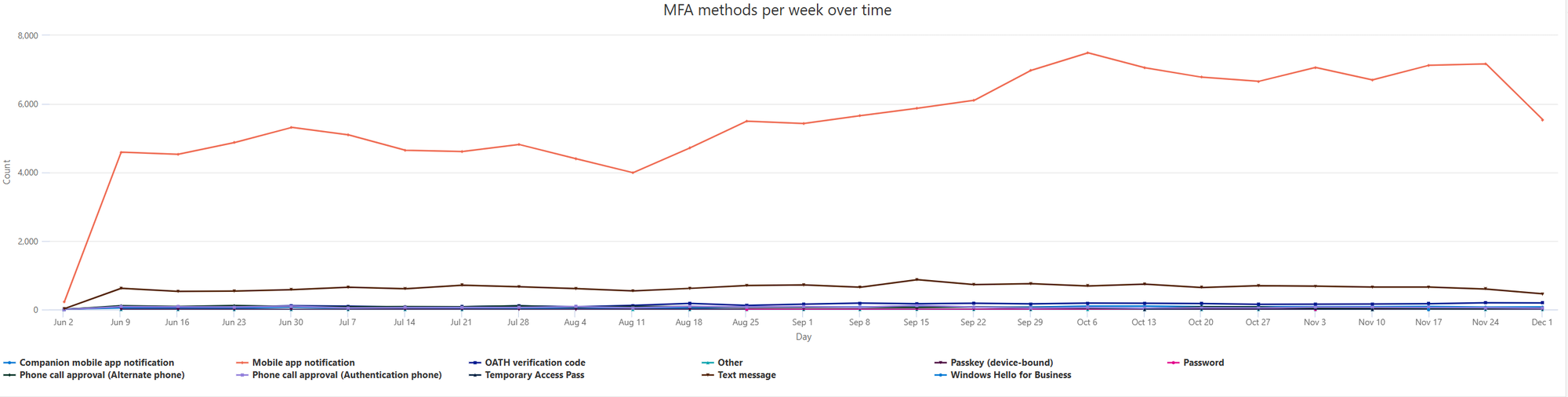
Entra ID - Audit logs
List Conditional Access policy changes
AuditLogs
| where ActivityDisplayName == "Update policy"
// Determine who initiated the policy update (user or app) - coalesce returns the first non-empty value
| extend InitiatedByActor = coalesce(
    tostring(InitiatedBy.user.userPrincipalName),
    tostring(InitiatedBy.app.displayName),
    tostring(InitiatedBy.user.displayName),
    tostring(InitiatedBy.app.servicePrincipalId))
// Categorize the initiator type
| extend InitiatedByType = case(
    isnotempty(tostring(InitiatedBy.user.userPrincipalName)) or isnotempty(tostring(InitiatedBy.user.displayName)), "User",
    isnotempty(tostring(InitiatedBy.app.displayName)) or isnotempty(tostring(InitiatedBy.app.servicePrincipalId)), "App",
    "Unknown")
// Extract policy name
| extend PolicyName = tostring(TargetResources[0].displayName)
| project ActivityDateTime, ActivityDisplayName, PolicyName, InitiatedByType, InitiatedByActor
List device registration policy changes
AuditLogs
| where OperationName == "Set device registration policies"
| project TimeGenerated, ActivityDisplayName, AdditionalDetails[0].value, InitiatedBy.user.userPrincipalName
List Windows LAPS password changes
AuditLogs
| where OperationName == "Update device local administrator password"
| extend DeviceName = tostring(TargetResources[0].displayName)
| project TimeGenerated, DeviceName, Result
List who added an application in Entra ID
Replace xxx with the DisplayName of the application you are searching for.
let TargetApp = "xxxx";   // displayName
AuditLogs
| where OperationName in ("Add application", "Add service principal")
| mv-expand TargetResources
| extend AppDisplayName = tostring(TargetResources.displayName)
| extend AppObjectId = tostring(TargetResources.id)
| extend AppId = tostring(parse_json(tostring(TargetResources.modifiedProperties))[0].newValue)
| where AppDisplayName has TargetApp or AppObjectId =~ TargetApp
| extend CreatedBy = coalesce(
    tostring(InitiatedBy.user.userPrincipalName),
    tostring(InitiatedBy.app.displayName),
    tostring(InitiatedBy.user.displayName),
    tostring(InitiatedBy.app.servicePrincipalId))
| extend CreatedByType = case(
    isnotempty(tostring(InitiatedBy.user.userPrincipalName)) or isnotempty(tostring(InitiatedBy.user.displayName)), "User",
    isnotempty(tostring(InitiatedBy.app.displayName)) or isnotempty(tostring(InitiatedBy.app.servicePrincipalId)), "App",
    "Unknown")
| project TimeGenerated, OperationName, AppDisplayName, AppObjectId, CreatedByType, CreatedBy
List who deleted an application in Entra ID
AuditLogs
| where OperationName in ("Delete application", "Delete service principal")
| extend tr = parse_json(TargetResources)[0]
| extend AppDisplayName = tostring(tr.displayName)
| extend AppId = tostring(tr.id)
| extend InitiatedByActor = coalesce(
    tostring(InitiatedBy.user.userPrincipalName),
    tostring(InitiatedBy.app.displayName),
    tostring(InitiatedBy.user.displayName),
    tostring(InitiatedBy.app.servicePrincipalId))
| extend InitiatedByType = case(
    isnotempty(tostring(InitiatedBy.user.userPrincipalName)) or isnotempty(tostring(InitiatedBy.user.displayName)), "User",
    isnotempty(tostring(InitiatedBy.app.displayName)) or isnotempty(tostring(InitiatedBy.app.servicePrincipalId)), "App",
    "Unknown")
| project TimeGenerated, OperationName, AppDisplayName, AppId, InitiatedByType, InitiatedByActor
List who created an object such as a user, group, or device
Replace xxx@domain with the UserPrincipalName/ObjectID/name of the object you are searching for.
let TargetUser = "xxx@domain";
AuditLogs
| where OperationName in ("Add group", "Add user", "Add device")
| where TargetResources has TargetUser
// Extract object information from TargetResources
| extend ObjectDisplayName = tostring(TargetResources[0].displayName)
| extend ObjectID = tostring(TargetResources[0].id)
// Determine who created the object (user or app) - coalesce returns the first non-empty value
| extend CreatedBy = coalesce(
    tostring(InitiatedBy.user.userPrincipalName),
    tostring(InitiatedBy.app.displayName),
    tostring(InitiatedBy.user.displayName),
    tostring(InitiatedBy.app.servicePrincipalId))
// Categorize the creator type
| extend CreatedByType = case(
    isnotempty(tostring(InitiatedBy.user.userPrincipalName)) or isnotempty(tostring(InitiatedBy.user.displayName)), "User",
    isnotempty(tostring(InitiatedBy.app.displayName)) or isnotempty(tostring(InitiatedBy.app.servicePrincipalId)), "App",
    "Unknown")
| project TimeGenerated, OperationName, ObjectDisplayName, ObjectID, CreatedByType, CreatedBy
List who modified an object such as a user, group, or device
Replace xxx@domain with the UserPrincipalName/ObjectID/name of the object you are searching for.
let TargetUser = "xxx@domain";
AuditLogs
| where OperationName in ("Update group", "Update user", "Update device")
| where TargetResources has TargetUser
// Extract object information from TargetResources
| extend ObjectDisplayName = tostring(TargetResources[0].displayName)
| extend ObjectID = tostring(TargetResources[0].id)
// Expand the properties that were modified (old value -> new value)
| mv-expand mp = TargetResources[0].modifiedProperties
| extend ModifiedProperty = tostring(mp.displayName)
| extend OldValue = tostring(mp.oldValue)
| extend NewValue = tostring(mp.newValue)
// Determine who modified the object (user or app) - coalesce returns the first non-empty value
| extend ModifiedBy = coalesce(
    tostring(InitiatedBy.user.userPrincipalName),
    tostring(InitiatedBy.app.displayName),
    tostring(InitiatedBy.user.displayName),
    tostring(InitiatedBy.app.servicePrincipalId))
// Categorize the modifier type
| extend ModifiedByType = case(
    isnotempty(tostring(InitiatedBy.user.userPrincipalName)) or isnotempty(tostring(InitiatedBy.user.displayName)), "User",
    isnotempty(tostring(InitiatedBy.app.displayName)) or isnotempty(tostring(InitiatedBy.app.servicePrincipalId)), "App",
    "Unknown")
| project TimeGenerated, OperationName, ObjectDisplayName, ObjectID, ModifiedProperty, OldValue, NewValue, ModifiedByType, ModifiedBy
| sort by TimeGenerated desc
List who deleted an object such as a user, group, or device
UserPrincipalName of a deleted user is sometimes prefixed by a 32-char hex ID (objectId without dashes).
This prefix hides the real UPN and breaks readability. We strip that prefix to show the actual UPN.
We also extract whether the delete was hard and which client performed the action.
AuditLogs
| where ActivityDisplayName in ("Delete user","Delete group","Delete device")
| extend tr = parse_json(TargetResources)[0]
// Extract target object information
| extend EntityType = tostring(tr.type)
| extend ObjectDisplayName = tostring(tr.displayName)
| extend rawUPN = tostring(tr.userPrincipalName)
| extend DeletedUserUPN = coalesce(extract(@"([A-Za-z0-9._%+\-]+@[A-Za-z0-9.\-]+\.[A-Za-z]{2,})", 1, rawUPN), rawUPN)
| extend DeletedUserUPN_NoGuidPrefix = coalesce(extract(@"^[0-9A-Fa-f]{32}(.*)$", 1, DeletedUserUPN), DeletedUserUPN)
// Determine who initiated the deletion (user or app) - coalesce returns the first non-empty value
| extend InitiatedByActor = coalesce(
    tostring(InitiatedBy.user.userPrincipalName),
    tostring(InitiatedBy.app.displayName),
    tostring(InitiatedBy.user.displayName),
    tostring(InitiatedBy.app.servicePrincipalId))
// Categorize the initiator type
| extend InitiatedByType = case(
    isnotempty(tostring(InitiatedBy.user.userPrincipalName)) or isnotempty(tostring(InitiatedBy.user.displayName)), "User",
    isnotempty(tostring(InitiatedBy.app.displayName)) or isnotempty(tostring(InitiatedBy.app.servicePrincipalId)), "App",
    "Unknown")
| mv-expand mp = tr.modifiedProperties
| extend prop = tostring(mp.displayName), val = trim('"', tostring(mp.newValue))
| summarize
    HardDeleted = anyif(tolower(val) == "true", prop == "Is Hard Deleted"),
    ActionClientName = anyif(val, prop == "Action Client Name")
    by TimeGenerated,
       ActivityDisplayName,
       EntityType,
       ObjectDisplayName,
       DeletedUserUPN,
       DeletedUserUPN_NoGuidPrefix,
       InitiatedByType,
       InitiatedByActor
List who enabled or disabled an object such as a user, group, or device
Replace xxx@domain with the UserPrincipalName/ObjectID/name of the object you are searching for.
let TargetAccount = "xxx@domain";
AuditLogs
| where ActivityDisplayName in ("Disable account", "Enable account")
| extend tr = parse_json(TargetResources)[0]
// Extract target account information
| extend EntityType = tostring(tr.type)
| extend ObjectDisplayName = tostring(tr.displayName)
| extend rawUPN = tostring(tr.userPrincipalName)
| extend TargetUserUPN = coalesce(
    extract(@"([A-Za-z0-9._%+\-]+@[A-Za-z0-9.\-]+\.[A-Za-z]{2,})", 1, rawUPN),
    rawUPN)
| extend TargetUserUPN_NoGuidPrefix = coalesce(
    extract(@"^[0-9A-Fa-f]{32}(.*)$", 1, TargetUserUPN),
    TargetUserUPN)
| where TargetUserUPN =~ TargetAccount
    or TargetUserUPN_NoGuidPrefix =~ TargetAccount
    or ObjectDisplayName =~ TargetAccount
// Determine who initiated the action
| extend InitiatedByActor = coalesce(
    tostring(InitiatedBy.user.userPrincipalName),
    tostring(InitiatedBy.app.displayName),
    tostring(InitiatedBy.user.displayName),
    tostring(InitiatedBy.app.servicePrincipalId))
| extend InitiatedByType = case(
    isnotempty(tostring(InitiatedBy.user.userPrincipalName))
        or isnotempty(tostring(InitiatedBy.user.displayName)), "User",
    isnotempty(tostring(InitiatedBy.app.displayName))
        or isnotempty(tostring(InitiatedBy.app.servicePrincipalId)), "App",
    "Unknown")
| extend InitiatedByIPAddress = coalesce(
    tostring(InitiatedBy.user.ipAddress),
    tostring(InitiatedBy.app.ipAddress))
| project
    TimeGenerated,
    Action = ActivityDisplayName,
    EntityType,
    ObjectDisplayName,
    TargetUserUPN,
    TargetUserUPN_NoGuidPrefix,
    InitiatedByType,
    InitiatedByActor,
    InitiatedByIPAddress,
    Result,
    ResultDescription,
    CorrelationId
| order by TimeGenerated desc
List membership changes for a specific group
Replace xxx@domain with the ObjectID/name of the group you are searching for.
let groupName = "xxx";
AuditLogs
| where OperationName in ("Add member to group", "Remove member from group")
// Extract group name from modified properties based on operation type
| extend GroupName = case(
    OperationName == "Add member to group",
        tostring(parse_json(tostring(parse_json(tostring(TargetResources[0].modifiedProperties))[1].newValue))),
    OperationName == "Remove member from group",
        tostring(parse_json(tostring(parse_json(tostring(TargetResources[0].modifiedProperties))[1].oldValue))),
    ""
)
| where GroupName == groupName
// Determine who initiated the operation (user or app) - coalesce returns the first non-empty value
| extend InitiatedByActor = coalesce(
    tostring(InitiatedBy.user.userPrincipalName),
    tostring(InitiatedBy.app.displayName),
    tostring(InitiatedBy.user.displayName),
    tostring(InitiatedBy.app.servicePrincipalId))
// Categorize the initiator type
| extend InitiatedByType = case(
    isnotempty(tostring(InitiatedBy.user.userPrincipalName)) or isnotempty(tostring(InitiatedBy.user.displayName)), "User",
    isnotempty(tostring(InitiatedBy.app.displayName)) or isnotempty(tostring(InitiatedBy.app.servicePrincipalId)), "App",
    "Unknown")
// Extract member information
| extend Member = tostring(TargetResources[0].userPrincipalName)
| project TimeGenerated, OperationName, GroupName, InitiatedByType, InitiatedByActor, Member
| order by TimeGenerated desc
List membership changes for dynamic Entra ID groups
AuditLogs
| where Category == "GroupManagement"
| where OperationName in ("Add member to group", "Remove member from group")
| where parse_json(tostring(InitiatedBy.app)).displayName == "Microsoft Approval Management"
// Extract group name from modified properties based on operation type
| extend GroupName = case(
    OperationName == "Add member to group",
        tostring(parse_json(tostring(parse_json(tostring(TargetResources[0].modifiedProperties))[1].newValue))),
    OperationName == "Remove member from group",
        tostring(parse_json(tostring(parse_json(tostring(TargetResources[0].modifiedProperties))[1].oldValue))),
    ""
)
// Determine who initiated the operation (user or app) - coalesce returns the first non-empty value
| extend InitiatedByActor = coalesce(
    tostring(InitiatedBy.user.userPrincipalName),
    tostring(InitiatedBy.app.displayName),
    tostring(InitiatedBy.user.displayName),
    tostring(InitiatedBy.app.servicePrincipalId))
// Categorize the initiator type
| extend InitiatedByType = case(
    isnotempty(tostring(InitiatedBy.user.userPrincipalName)) or isnotempty(tostring(InitiatedBy.user.displayName)), "User",
    isnotempty(tostring(InitiatedBy.app.displayName)) or isnotempty(tostring(InitiatedBy.app.servicePrincipalId)), "App",
    "Unknown")
// Extract member information
| extend MemberUser = tostring(TargetResources[0].userPrincipalName)
| project TimeGenerated, OperationName, GroupName, InitiatedByType, InitiatedByActor, MemberUser
| order by TimeGenerated desc
List successful Self-Service Password Reset (SSPR) events with validation methods, client type and on-premises agent
For your information, you can also retrieve this data in Entra ID (but it's limited to a maximum of 30 days): https://entra.microsoft.com/#view/Microsoft_AAD_IAM/AuthenticationMethodsMenuBlade/~/RegistrationAndResetLogs > Filter Activity type: Reset or https://entra.microsoft.com/#view/Microsoft_AAD_IAM/AuthenticationMethodsMenuBlade/~/AuthMethodsActivity > Usage tab
AuditLogs
// Filter for successful self-service password reset events
| where OperationName contains "Reset password (self-service)"
| where ResultDescription == "Successfully completed reset."
| where Result == "success"
// Extract user principal name and IP address of the initiator
| extend UserPrincipalName = tostring(InitiatedBy.user.userPrincipalName)
| extend IpAddress = tostring(InitiatedBy.user.ipAddress)
// Expand the AdditionalDetails array to access key/value pairs
| mv-expand AdditionalDetails
| extend Key = tostring(AdditionalDetails["key"]), Value = tostring(AdditionalDetails["value"])
// Aggregate key/value pairs into a dynamic object (bag)
| summarize Details = make_bag(pack(Key, Value)) by TimeGenerated, UserPrincipalName, IpAddress
// Extract specific fields from the bag
// Use replace to remove brackets and quotes from the MFA method string (stored as JSON array)
| extend ClientType = tostring(Details["ClientType"]),
         MethodsUsedForValidation = replace(@'[\[\]"]', '', tostring(Details["MethodsUsedForValidation"])),
         OnPremisesAgent = tostring(Details["OnPremisesAgent"])
| project TimeGenerated, UserPrincipalName, IpAddress, ClientType, MethodsUsedForValidation, OnPremisesAgent, Details
Group successful SSPR events by user and validation method
AuditLogs
| where OperationName contains "Reset password (self-service)"
| where ResultDescription == "Successfully completed reset."
| where Result == "success"
| extend UserPrincipalName = tostring(InitiatedBy.user.userPrincipalName)
| mv-expand AdditionalDetails
| extend Key = tostring(AdditionalDetails["key"]), Value = tostring(AdditionalDetails["value"])
| summarize Details = make_bag(pack(Key, Value)) by TimeGenerated, UserPrincipalName
| extend Method = replace(@'[\[\]"]', '', tostring(Details["MethodsUsedForValidation"]))
| summarize Count = count() by Method, UserPrincipalName
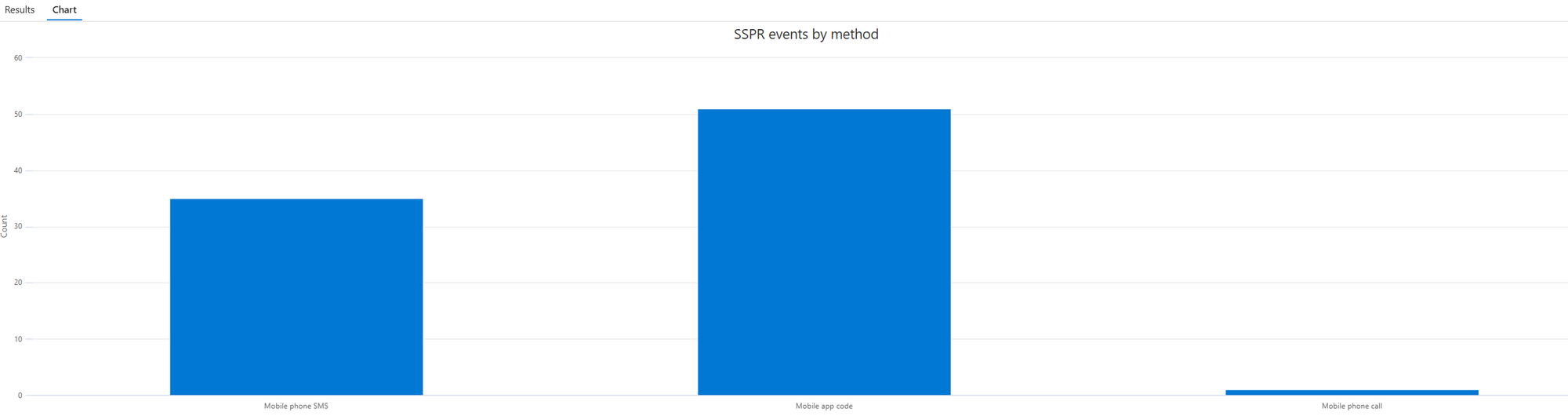
Chart successful Self-Service Password Reset (SSPR) events by validation method
AuditLogs
| where OperationName contains "Reset password (self-service)"
| where ResultDescription == "Successfully completed reset."
| where Result == "success"
| extend UserPrincipalName = tostring(InitiatedBy.user.userPrincipalName)
| extend IpAddress = tostring(InitiatedBy.user.ipAddress)
| mv-expand AdditionalDetails
| extend Key = tostring(AdditionalDetails["key"]), Value = tostring(AdditionalDetails["value"])
| summarize Details = make_bag(pack(Key, Value)) by TimeGenerated, UserPrincipalName, IpAddress
// Extract and clean up the MFA method field
// Replace removes brackets and quotes from the string (original format: ["Mobile phone SMS"])
| extend Method = replace(@'[\[\]"]', '', tostring(Details["MethodsUsedForValidation"]))
| summarize Count = count() by Method
| render columnchart with (title="SSPR events by method")
Result:
List QR codes added to users by administrators for QR code sign-in
AuditLogs
| where Category == "UserManagement"
| where ActivityDisplayName == "Admin updated security info"
| where ResultDescription == "Admin changed QRcode Pin Authentication Method for user"
List objects created through Microsoft Entra Connect Sync or Microsoft Entra Cloud Sync
It seems that dirsyncEnabled did not exist before August 8 2025 (not verified).
AuditLogs
| where OperationName startswith "Add"
| where Result == "success"
| extend tr = parse_json(TargetResources)[0]
| extend props = tr.modifiedProperties
| mv-apply p = props on (summarize propBag = make_bag(pack(tostring(p.displayName), tostring(p.newValue))))
| where tostring(propBag["Action Client Name"]) contains "DirectorySync"
// Determine who created the user (user or app) - coalesce returns the first non-empty value
| extend createdBy = coalesce(
    tostring(InitiatedBy.user.userPrincipalName),
    tostring(InitiatedBy.app.displayName),
    tostring(InitiatedBy.user.displayName),
    tostring(InitiatedBy.app.servicePrincipalId))
// Categorize the creator type
| extend createdByType = case(
    isnotempty(tostring(InitiatedBy.user.userPrincipalName)) or isnotempty(tostring(InitiatedBy.user.displayName)), "User",
    isnotempty(tostring(InitiatedBy.app.displayName)) or isnotempty(tostring(InitiatedBy.app.servicePrincipalId)), "App",
    "Unknown")
// Extract user information
| extend userName = tostring(tr.userPrincipalName)
| extend userId = tostring(tr.id)
| extend targetDisplayName = tostring(tr.displayName)
| extend accountEnabled = tostring(propBag["AccountEnabled"])
| extend lastDirSyncTime = tostring(propBag["LastDirSyncTime"])
| extend actionClientName = tostring(propBag["Action Client Name"])
// it seems that dirsyncEnabled did not exist before August 8 2025 (not verified)
| extend dirSyncEnabled = tostring(propBag["DirSyncEnabled"])
| project TimeGenerated, OperationName, userName, userId, targetDisplayName, accountEnabled, createdByType, createdBy, lastDirSyncTime, actionClientName, dirSyncEnabled
List synchronized user changes and modified attributes from Microsoft Entra Connect Sync or Microsoft Entra Cloud Sync
AuditLogs
| where Category == "UserManagement"
| where Result == "success"
| extend tr = parse_json(TargetResources)[0]
| extend props = tr.modifiedProperties
| mv-apply p = props on (summarize propBag = make_bag(pack(tostring(p.displayName), tostring(p.newValue))))
| where tostring(propBag["Action Client Name"]) contains "DirectorySync"
| extend Actor = coalesce(
    tostring(InitiatedBy.user.userPrincipalName),
    tostring(InitiatedBy.app.displayName),
    tostring(InitiatedBy.user.displayName),
    tostring(InitiatedBy.app.servicePrincipalId))
| extend TargetUser = tostring(tr.userPrincipalName)
| extend TargetId = tostring(tr.id)
| extend actionClientName = tostring(propBag["Action Client Name"])
| mv-expand p = props
| extend Attribute = tostring(p.displayName)
| where Attribute != ""
    and Attribute != "Action Client Name"
    and Attribute != "Included Updated Properties"
    and Attribute != "LastDirSyncTime"
    and Attribute !startswith "TargetId."
| extend OldValue = tostring(p.oldValue),
         NewValue = tostring(p.newValue)
| project TimeGenerated, TargetUser, Attribute, OldValue, NewValue, Actor, TargetId
| sort by TimeGenerated desc
List users created manually in Microsoft Entra ID or Microsoft 365
Note: If the creation was done through other services, for example from Exchange Online (Admin Center or PowerShell), you will not see the name of the user who created it. Instead, you will see Microsoft Substrate Management.
AuditLogs
| where OperationName == "Add user"
| where Result == "success"
| extend tr = parse_json(TargetResources)[0]
| extend props = tr.modifiedProperties
| mv-apply p = props on (summarize propBag = make_bag(pack(tostring(p.displayName), tostring(p.newValue))))
| where tostring(propBag["Action Client Name"]) notcontains "DirectorySync"
| where Identity != "Microsoft B2B Admin Worker"
| extend createdByUPN = tostring(InitiatedBy.user.userPrincipalName)
| extend createdByApp = tostring(InitiatedBy.app.displayName)
| extend createdBy = iff(createdByUPN != "", createdByUPN, createdByApp)
| extend userName = tostring(tr.userPrincipalName)
| extend userId = tostring(tr.id)
| extend accountEnabled = tostring(propBag["AccountEnabled"])
| project TimeGenerated, userName, userId, accountEnabled, createdBy
List guest users created through the invitation workflow
AuditLogs
| where OperationName == "Add user"
| where Result == "success"
| where Identity == "Microsoft B2B Admin Worker"
| where InitiatedBy.app.displayName != "Microsoft B2B Admin Worker"
| extend tr = parse_json(TargetResources)[0]
| extend props = tr.modifiedProperties
| mv-apply p = props on (summarize propBag = make_bag(pack(tostring(p.displayName), tostring(p.newValue))))
| extend createdByUPN = tostring(InitiatedBy.user.userPrincipalName)
| extend createdByApp = tostring(InitiatedBy.app.displayName)
| extend createdBy = iff(createdByUPN != "", createdByUPN, createdByApp)
| extend userName = tostring(tr.userPrincipalName)
| extend userId = tostring(tr.id)
| project TimeGenerated, userName, userId, createdBy
List guest users created through B2B cross-tenant synchronization or a multitenant organization (MTO)
AuditLogs
| where OperationName == "Add user"
| where Result == "success"
| where Identity == "Microsoft B2B Admin Worker"
| where InitiatedBy.app.displayName == "Microsoft B2B Admin Worker"
| extend tr = parse_json(TargetResources)[0]
| extend props = tr.modifiedProperties
| mv-apply p = props on (summarize propBag = make_bag(pack(tostring(p.displayName), tostring(p.newValue))))
| extend createdByUPN = tostring(InitiatedBy.user.userPrincipalName)
| extend createdByApp = tostring(InitiatedBy.app.displayName)
| extend createdBy = iff(createdByUPN != "", createdByUPN, createdByApp)
| extend userName = tostring(tr.userPrincipalName)
| extend userId = tostring(tr.id)
| project TimeGenerated, userName, userId, createdBy
List external user sign-ins
Filtering external users on UserType == "Guest" is unreliable. As explained in https://itpro-tips.com/usertype-empty-in-microsoft-365/, UserType can be empty (accounts created before August 31, 2014) or manually set to Member.
External users provisioned via B2B Cross-Tenant Sync / MTO are also flagged as Member by design. A more reliable approach ignores UserType and compares tenants: an external user always signs in from a HomeTenantId different from the resource tenant (AADTenantId).
SigninLogs
  // External users: home tenant differs from resource tenant (covers Guest AND Member-flagged externals)
  | where isnotempty(HomeTenantId) and HomeTenantId != AADTenantId
  | project TimeGenerated, UserPrincipalName, ResultType, AppDisplayName, AuthenticationRequirement, ConditionalAccessPolicies
List credentials added to an application
See https://posts.specterops.io/update-dumping-entra-connect-sync-credentials-4a9114734f71
AuditLogs
| where ActivityDisplayName has_any ("Add service principal credentials", "Update application", "Add key credential")
| where TargetResources[0].type =~ "Application"
| extend AppName = tostring(TargetResources[0].displayName)
| extend ChangedProps = TargetResources[0].modifiedProperties
| extend Initiator = tostring(InitiatedBy.user.displayName)
| project TimeGenerated, AppName, ActivityDisplayName, Initiator, ChangedProps
| where ChangedProps has_any ("keyCredentials", "passwordCredentials")
List Temporary Access Pass (TAP) creation events
AuditLogs
| where ResultDescription == "Admin registered temporary access pass method for user"
| extend InitiatedByActor = coalesce(
    tostring(InitiatedBy.user.userPrincipalName),
    tostring(InitiatedBy.app.displayName),
    tostring(InitiatedBy.user.displayName),
    tostring(InitiatedBy.app.servicePrincipalId))
| extend InitiatedByType = case(
    isnotempty(tostring(InitiatedBy.user.userPrincipalName)) or isnotempty(tostring(InitiatedBy.user.displayName)), "User",
    isnotempty(tostring(InitiatedBy.app.displayName)) or isnotempty(tostring(InitiatedBy.app.servicePrincipalId)), "App",
    "Unknown")
| extend TargetUser = tostring(coalesce(
    tostring(TargetResources[0].userPrincipalName),
    tostring(TargetResources[1].userPrincipalName),
    tostring(TargetResources[2].userPrincipalName),
    tostring(TargetResources[0].displayName)))
| project TimeGenerated, TargetUser, InitiatedByActor, InitiatedByType, OperationName, ResultDescription
Microsoft Graph activity logs
List Microsoft Graph API calls made by a specific user
MicrosoftGraphActivityLogs identifies the caller by UserId, which holds the object ID, not the user principal name. There is no UPN column in that table, so resolving a user by name means looking the object ID up somewhere else, and the sign-in logs are the practical place to do it.
let lookback = 1d;
let targetUpn = "xxx@domain";
MicrosoftGraphActivityLogs
| where TimeGenerated > ago(lookback)
| join kind=inner (
    SigninLogs
    | where TimeGenerated > ago(lookback)
    | where UserPrincipalName =~ targetUpn
    | summarize UPN = any(UserPrincipalName) by UserId
) on UserId
| project-away UserId1
| extend UPN = UPN
Three things will make this query return nothing, and none of them mean the user
made no Graph call.
The time range applies to both tables. The picker filters MicrosoftGraphActivityLogs and the sign-in logs at once. If the user made a Graph call this morning but last signed in three weeks ago, a 24-hour range finds the API calls, finds no sign-in to map the object ID against, and the inner join returns an empty result. Set the picker to Set in query so the explicit ago(lookback) filters above apply, or widen the range far enough to cover a sign-in.
SigninLogs only contains interactive sign-ins. Non-interactive ones live in ADNonInteractiveUserSignInLogs, which is where a user signing in through a long-lived token mostly shows up. The union above covers both; isfuzzy=true keeps the query working if that table is not enabled in the workspace.
UserId is empty for app-only calls. An application using application ermissions has no signed-in user, so it carries a ServicePrincipalId and no UserId. This query is about delegated calls only. To follow an application instead, pivot on AppId and ServicePrincipalId.
Use Insights and Reporting for Conditional Access policies
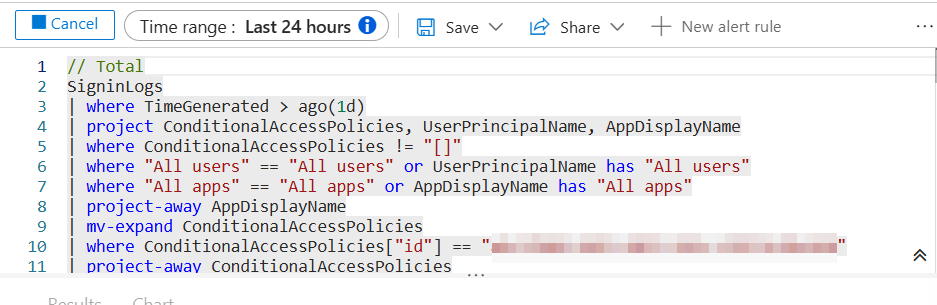
You can also use Insights and Reporting in Microsoft Entra ID > Conditional Access (https://entra.microsoft.com/#view/Microsoft_AAD_ConditionalAccess/ConditionalAccessBlade/~/InsightsAndReporting/menuId/Policies/fromNav/) to get useful information about conditional access. This relies on Log Analytics data, so you must already be ingesting Entra ID data into Log Analytics (also a prerequisite for the KQL queries shown earlier).
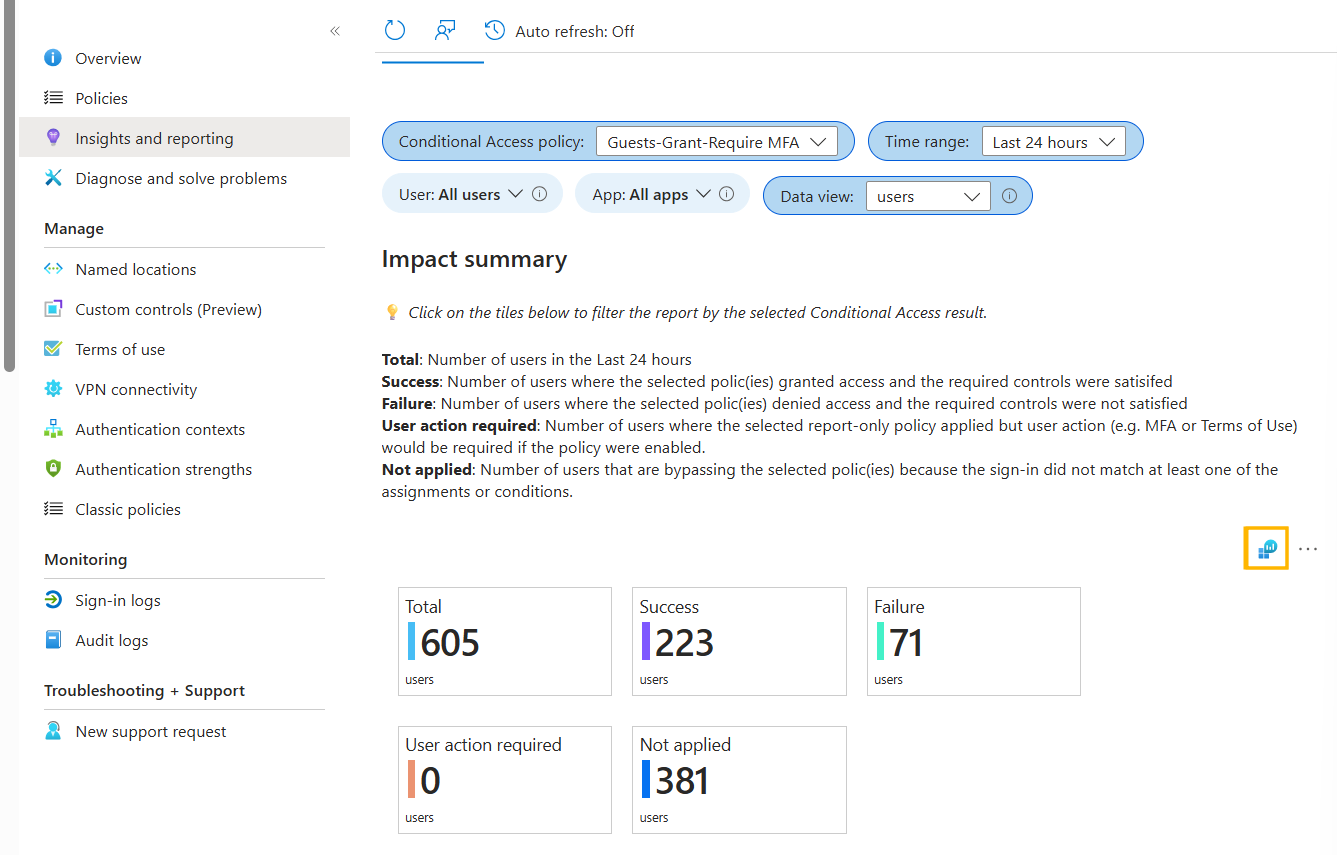
One interesting point is that you can access the underlying KQL query by clicking the button highlighted in orange in the screenshot above. This gives: